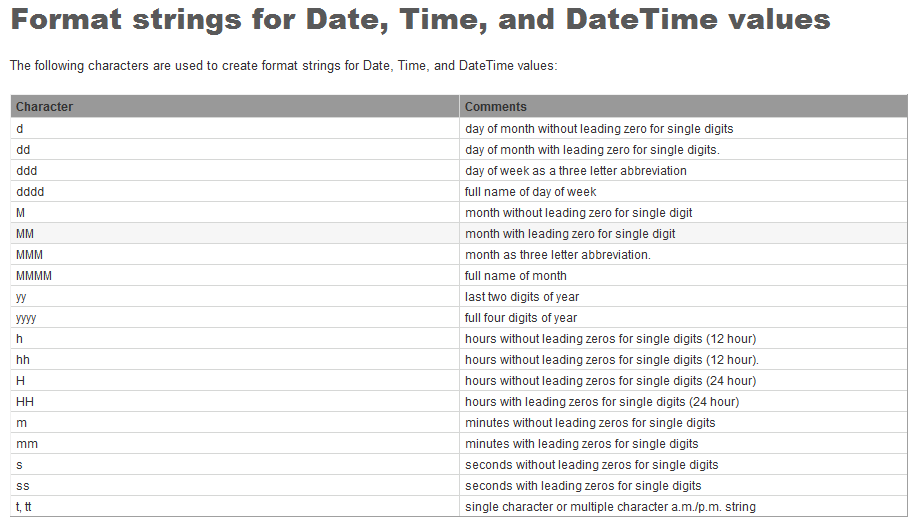
When in the formula editor, put the cursor in the word ToText then press the F1 key on your keyboard. That brings up the CR Help entry for that command. From there, scroll down then click for more details on the date format strings to get this:
------------------------------
Kevin Moyes
Technical Systems Analyst
Munjal White Consulting Co.
------------------------------
Original Message:
Sent: 04-18-2023 21:32
From: Karen O'Lane
Subject: Crystal Date Format
@Therese LogeaisI tried that also but it still printed the slashes. To be fair to my co-worker, @Chris Love
he suggested the same thing that David did, "MMddyyyy", but I missed the upper/lower case thing. Who's blind?
------------------------------
Karen O'Lane
Accounting Systems, Inc. (ASI)
kolane@asifocus.com
90 Minds Secretary
------------------------------
Original Message:
Sent: 04-18-2023 21:26
From: Karen O'Lane
Subject: Crystal Date Format
I tried that also but it still printed the slashes. To be fair to my co-worker, @Chris Love
he suggested the same thing that David did, "MMddyyyy", but I missed the upper/lower case thing. Who's blind?
------------------------------
Karen O'Lane
Accounting Systems, Inc. (ASI)
kolane@asifocus.com
90 Minds Secretary
Original Message:
Sent: 04-18-2023 20:21
From: Therese Logeais
Subject: Crystal Date Format
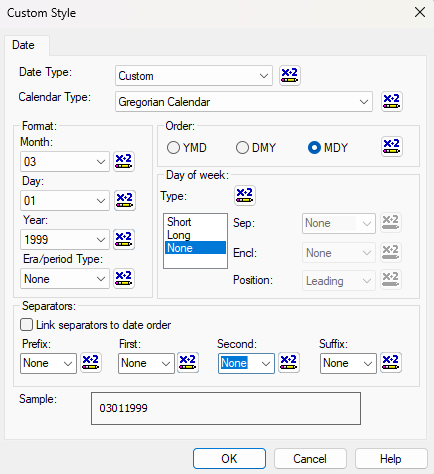
Or you could just use the format editor:
------------------------------
Therese Logeais, Technology Integrators
Original Message:
Sent: 04-18-2023 19:59
From: Karen O'Lane
Subject: Crystal Date Format
Oh. Duh! Thank you, @David Speck II
------------------------------
Karen O'Lane
Accounting Systems, Inc. (ASI)
kolane@asifocus.com
90 Minds Secretary
Original Message:
Sent: 04-18-2023 19:55
From: David Speck II
Subject: Crystal Date Format
Use "MMddyyyy".
Thanks,
David Speck
Senior Sage 100 Developer | O: 949.583.9500 x1156
dspeck@blytheco.com | www.blytheco.com
ACUMATICA PARTNER OF THE YEAR | SAGE INTACCT | SAGE 100 PLATINUM ELITE | CREATIO GOLD PARTNER
This message contains information that may be confidential and privileged. Unless you are the addressee (or authorized to receive for the addressee) you may not use, copy, or disclose to anyone the message or any information contained in the message. If you have received the message in error, please advise the sender by reply email, and delete the message. Thank you.