You might try backing up then rebuilding the data dictionary from kb 76315:
Select File, then Run.
Enter SYZCON in the Program field
Select OK.
At the prompt, enter the following command: X=NEW("SY_ACTIVATION_BUS",%SYS_SS)
Press the ENTER key
At the prompt, enter the following command: ? X'ACTIVATE("y/y","xxx")
y/y = module code (for example: A/R, S/O, C/I, or I/M)
xxx = company code (for example: ABC)
1 is returned if the command was successful
0 is returned if the command failed
Press the ENTER key
At the prompt, enter the following command: BYE
Press the ENTER key
Note: When you run the SYZCON script to update data files/tables from the dictionary, we are expecting a '1' to be returned to verify that the command was successful. If a '0' is returned, in SYZCON run the following script to identify the last error message:
? X'LastErrorMsg$ This should give some direction as to the next steps to troubleshoot the issue.
------------------------------
Doug Higgs
Assistant Technical Support / Building Maintenance Specialist
Midwest Commerce Solutions, Inc
------------------------------
Original Message:
Sent: 05-31-2019 10:29
From: Jeff Schwenk
Subject: Creating UDT - v2018 ADV PU 6
Well I sometimes forget that Canada is up north..........
Dan, let me know the case number after you call Sage tech support......
------------------------------
Jeff Schwenk
FORMER 90M Board Member
Bottomline Software, Inc.
Waynesboro VA
540-221-4444
------------------------------
Original Message:
Sent: 05-31-2019 09:45
From: Kevin Moyes
Subject: Creating UDT - v2018 ADV PU 6
According to Sage marketing, there is no Sage 100 in Canada. We do not exist.
------------------------------
Kevin Moyes
Technical Systems Analyst
Munjal White Consulting Co.
Toronto ON
Original Message:
Sent: 05-30-2019 20:06
From: Jeff Schwenk
Subject: Creating UDT - v2018 ADV PU 6
Are you using a Canadian version of Sage 100? Can I call you tomorrow to learn your secret sauce.
------------------------------
Jeff Schwenk
FORMER 90M Board Member
Bottomline Software, Inc.
Waynesboro VA
540-221-4444
Original Message:
Sent: 05-30-2019 18:26
From: Kevin Moyes
Subject: Creating UDT - v2018 ADV PU 6
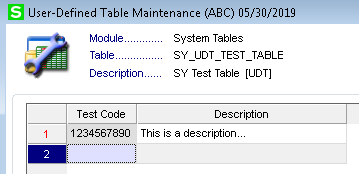
2018.6 Standard... no problem.
------------------------------
Kevin Moyes
Technical Systems Analyst
Munjal White Consulting Co.
Toronto ON
Original Message:
Sent: 05-30-2019 18:12
From: Jeff Schwenk
Subject: Creating UDT - v2018 ADV PU 6
Can someone do me a favor and create a two column SYSTEM UDT in either 2018 or 2019? Key field is 10 characters multi line and the second field is 30 characdters multi line. The try to populate the UDT.
I would like to know if it is fat fingers and old age or a certifiable bug. Module UDT's are fine. Just the system.
TIA
------------------------------
Jeff Schwenk
FORMER 90M Board Member
Bottomline Software, Inc.
Waynesboro VA
540-221-4444
Original Message:
Sent: 05-29-2019 23:20
From: Jeff Schwenk
Subject: Creating UDT - v2018 ADV PU 6
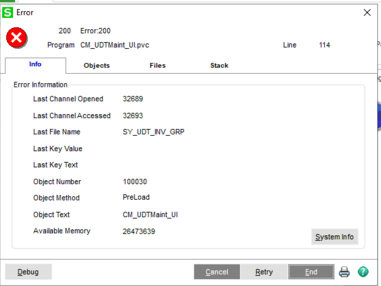
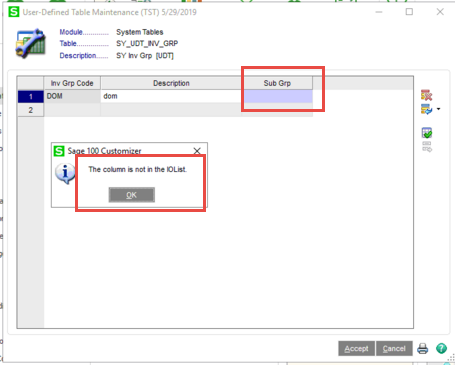
Ok, so I gave up trying to make this work on the clients v2018 installation. They have been wanting me to migrate the installation to a new Server 2019 OS so moved it tonight and am now running v2019. And I am still having the same issue though the errors are slightly different. This time, I created a UDT with three fields instead of two. I was able to enter data into the first two fields, but the error message appeared when trying to complete the third (last field).
And for grins and giggles, I created a UDT on my installation of v2019 and I encountered the exact issue there as well.
------------------------------
Jeff Schwenk
FORMER 90M Board Member
Bottomline Software, Inc.
Waynesboro VA
540-221-4444
Original Message:
Sent: 05-29-2019 17:29
From: Jeff Schwenk
Subject: Creating UDT - v2018 ADV PU 6
The UDT was created. I can see it via DFDM. It shows both fields. However, when I edit it, I cannot enter a value for the second one. Very strange.
------------------------------
Jeff Schwenk
FORMER 90M Board Member
Bottomline Software, Inc.
Waynesboro VA
540-221-4444
Original Message:
Sent: 05-29-2019 17:08
From: Kevin Moyes
Subject: Creating UDT - v2018 ADV PU 6
Restricted NTFS permissions on the MAS_System folder?
------------------------------
Kevin Moyes
Technical Systems Analyst
Munjal White Consulting Co.
Toronto ON
Original Message:
Sent: 05-29-2019 16:23
From: Jeff Schwenk
Subject: Creating UDT - v2018 ADV PU 6
System UDT not working. I set up an IM table without issue. Wonder if the data dictionary is flakey
------------------------------
Jeff Schwenk
FORMER 90M Board Member
Bottomline Software, Inc.
Waynesboro VA
540-221-4444
Original Message:
Sent: 05-29-2019 15:55
From: Jeff Schwenk
Subject: Creating UDT - v2018 ADV PU 6
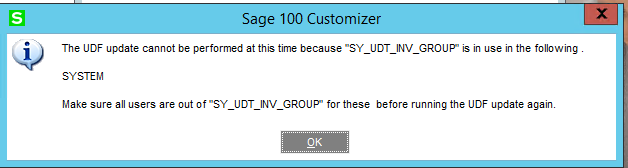
So I reboot the server, delete the old table, create a new one (different name), only create one column and this is my reward....
------------------------------
Jeff Schwenk
FORMER 90M Board Member
Bottomline Software, Inc.
Waynesboro VA
540-221-4444
Original Message:
Sent: 05-29-2019 14:22
From: Kevin Moyes
Subject: Creating UDT - v2018 ADV PU 6
Very odd indeed. Maybe that is somehow a reserved key word. Try a different field name perhaps?
------------------------------
Kevin Moyes
Technical Systems Analyst
Munjal White Consulting Co.
Toronto ON
Original Message:
Sent: 05-29-2019 14:17
From: Jeff Schwenk
Subject: Creating UDT - v2018 ADV PU 6
Just the word Description. Per a KB article, I have requested a server reboot.
Very strange.
------------------------------
Jeff Schwenk
FORMER 90M Board Member
Bottomline Software, Inc.
Waynesboro VA
540-221-4444
Original Message:
Sent: 05-29-2019 14:07
From: Kevin Moyes
Subject: Creating UDT - v2018 ADV PU 6
Any special characters in the column name?
------------------------------
Kevin Moyes
Technical Systems Analyst
Munjal White Consulting Co.
Toronto ON