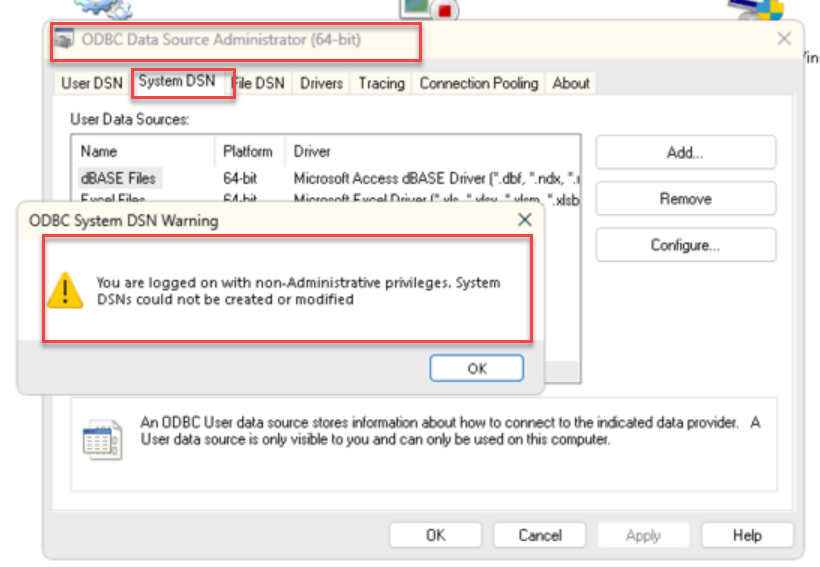
The error message, being blocked from even trying to create a system DSN, is something else entirely.
Munjal White Consulting Co.
Original Message:
Sent: 12-04-2025 17:39
From: Jeff Schwenk
Subject: Creating 64-bit SYSTEM dsn in WIN 11
As I have been saying.......
------------------------------
Jeff Schwenk
Owner
Bottomline Software, Inc.
Waynesboro VA
(540) 221-4444
Improving bottom lines for over 25 years!
------------------------------
Original Message:
Sent: 12-04-2025 17:36
From: Kevin Moyes
Subject: Creating 64-bit SYSTEM dsn in WIN 11
Strange... I can create the MS Access DSN, see / use it in Excel, but it is invisible in the 64-bit ODBC settings. I've never encountered that before.
------------------------------
Kevin Moyes
Technical Systems Analyst
Munjal White Consulting Co.
Toronto ON
Original Message:
Sent: 12-04-2025 16:24
From: Jeff Schwenk
Subject: Creating 64-bit SYSTEM dsn in WIN 11
@Kevin Moyes - I've gotten that far many times. And saved it. However, it never appears in the list of DSN's after that. Please post a screen shot of the DSN that you created.
------------------------------
Jeff Schwenk
Owner
Bottomline Software, Inc.
Waynesboro VA
(540) 221-4444
Improving bottom lines for over 25 years!
Original Message:
Sent: 12-04-2025 12:27
From: Doug Higgs
Subject: Creating 64-bit SYSTEM dsn in WIN 11
@Jeff Schwenk Have you tried logging on as user Administrator? If you are using a user account that is supposed to have administrator rights then that user should be able to change the computer's administrator password. If you can;t change the Administrator password for that computer then you don't have administrator rights.
------------------------------
Doug Higgs
Midwest Commerce Solutions, Inc
(312) 315-0960
Chauffeur, Chef, and Personal Assistant to Sprinkles
Original Message:
Sent: 12-04-2025 05:46
From: Jeff Schwenk
Subject: Creating 64-bit SYSTEM dsn in WIN 11
Are you able to create a 64bit system DSN for Access? I am unsuccessful even on my laptop
------------------------------
Jeff Schwenk
Owner
Bottomline Software, Inc.
Waynesboro VA
(540) 221-4444
Improving bottom lines for over 25 years!
Original Message:
Sent: 12-03-2025 19:48
From: Kevin Moyes
Subject: Creating 64-bit SYSTEM dsn in WIN 11
That's it. If you have logged off Windows / back in again, and it still doesn't work, I'm out of ideas.
------------------------------
Kevin Moyes
Technical Systems Analyst
Munjal White Consulting Co.
Toronto ON
Original Message:
Sent: 12-03-2025 16:00
From: Jeff Schwenk
Subject: Creating 64-bit SYSTEM dsn in WIN 11
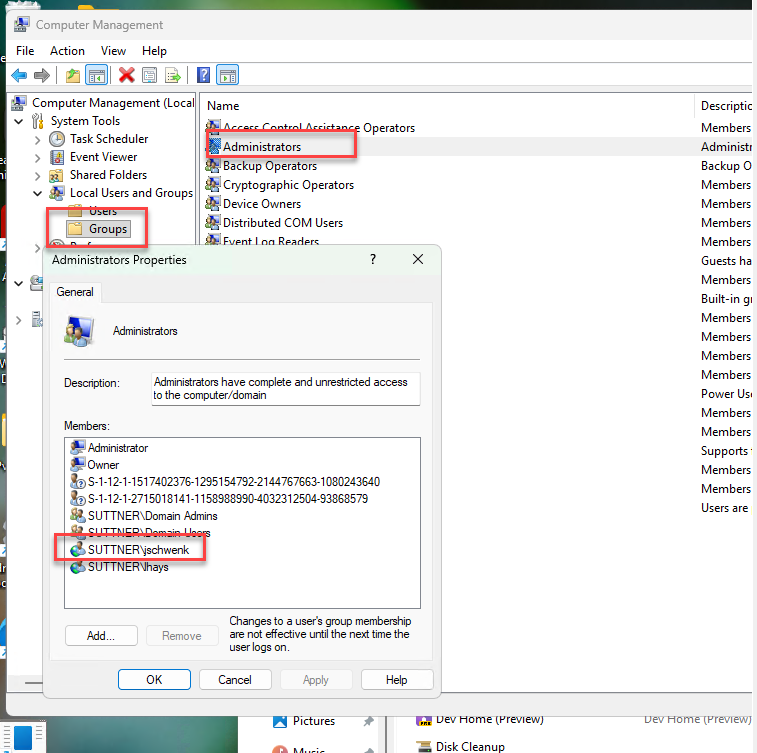
is this what you are referring to? it appears that I am an administrator. If so, I am still running into the roadblock.
------------------------------
Jeff Schwenk
Owner
Bottomline Software, Inc.
Waynesboro VA
(540) 221-4444
Improving bottom lines for over 25 years!
Original Message:
Sent: 12-01-2025 17:31
From: Kevin Moyes
Subject: Creating 64-bit SYSTEM dsn in WIN 11
"Full Permissions" is not necessarily the same thing as a local Administrator. Skilled IT of any experience level should know that.
This error is literally saying you are not in the Local Administrator group.

If you are a local admin, and still unable to create the System DSN, the only other idea I have is some kind of group policy restriction... but that would have been done purposefully.
------------------------------
Kevin Moyes
Technical Systems Analyst
Munjal White Consulting Co.
Toronto ON
Original Message:
Sent: 12-01-2025 17:26
From: Jeff Schwenk
Subject: Creating 64-bit SYSTEM dsn in WIN 11
Not so simple. Their IT guru gave me full permissions.
Are you saying I have to be in the Admin group? That their IT guy of 20 years should know more?
------------------------------
Jeff Schwenk
Owner
Bottomline Software, Inc.
Waynesboro VA
(540) 221-4444
Improving bottom lines for over 25 years!
Original Message:
Sent: 12-01-2025 17:05
From: Kevin Moyes
Subject: Creating 64-bit SYSTEM dsn in WIN 11
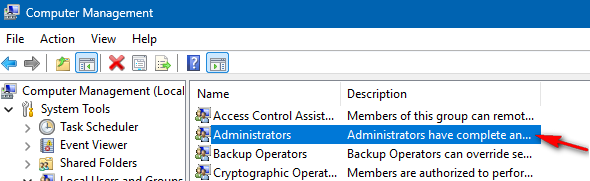
Simple: the login you are using is not a local administrator on that machine.
Add the user to this user Group, log off, then back on again (to refresh the Windows access token).
------------------------------
Kevin Moyes
Technical Systems Analyst
Munjal White Consulting Co.
Toronto ON
Original Message:
Sent: 12-01-2025 17:02
From: Jeff Schwenk
Subject: Creating 64-bit SYSTEM dsn in WIN 11
Screenshot below. If you click ok, then click add, you can go through the motions of setting up an Access DSN to a specific table. Click ok, but nothing is created. User DSN can be created. I want a system DSN because this is a shared workstation. Yes, I could create a DSN for each user, but would rather know the secret sauce for a system DSN. Their IT guru is baffled.
------------------------------
Jeff Schwenk
Owner
Bottomline Software, Inc.
Waynesboro VA
(540) 221-4444
Improving bottom lines for over 25 years!
Original Message:
Sent: 12-01-2025 15:46
From: Kevin Moyes
Subject: Creating 64-bit SYSTEM dsn in WIN 11
Is there an error? Are the 64-bit drivers available? What version of Sage 100?
Obviously you need to use the 64-bit ODBC tool...

------------------------------
Kevin Moyes
Technical Systems Analyst
Munjal White Consulting Co.
Toronto ON