Good news!
Here are my notes for setting up a linked server, for future reference:
Configure a Silent DSN
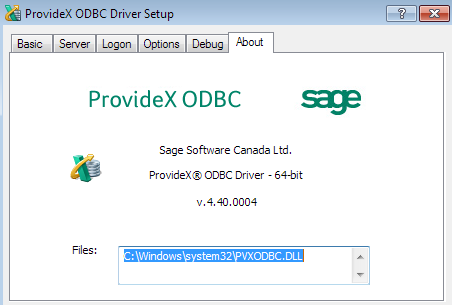
As usual…but , if using 64-bit SQL, with 64-bit ODBC driver v4.4.4 (the version that comes with Sage 2014) or above.
Configure SQL Server options
From MS SQL Server Management Studio
Scroll to Server Objects => Linked Servers => Providers
Right Click MSDASQL => Properties
The only options selected should be "Allow in Process" & "Level zero only"
Select the above options and click OK
From The SQL Server "New Query"
sp_configure 'show advanced options', 1;
RECONFIGURE;
GO
sp_configure 'Ad Hoc Distributed Queries', 1;
RECONFIGURE;
GO
Execute the query
Create the linked server in SQL Management Studio
Linked Servers Right Click => New Linked Server
Linked Server Name = DSN NAME
Server Type = Other Data Source
Provider = Microsoft OLE DB Provider for ODBC Drivers
Product name = DSN NAME
Data source = DSN NAME
Define a Connection String(Provider String)
Driver={MAS 90 4.0 ODBC Driver}; UID=userid; PWD=password; Company=ABC; Directory=\\UNC to ….\MAS90; LogFile=C:\PVXODBC.LOG; CacheSize=4; DirtyReads=1; BurstMode=1; StripTrailingSpaces=1; SILENT=1; SERVER=NotTheServer
*Notes
SILENT=1; Since SQL Server is running as a Service, any errors that force a dialog will not display and cause the process to continue running.
Change the SQL Service to run under a domain login (so it can access the UNC). (Always use SQL Configuration Manager for the SQL service change, not Windows Services).
I read on SageCity that the DirtyReads / BurstMode references need to be removed, but I'm not sure that is necessary.
Test the connection
SELECT * FROM OPENQUERY (DSN_Name, 'Select * from GL_Account')
------------------------------
Kevin Moyes
Technical Systems Analyst
Munjal White Consulting Co.
Toronto ON
------------------------------
Original Message:
Sent: 01-15-2025 15:30
From: Tara Schinkel
Subject: Connecting SQL to Sage 100
I got it working!
SQL express was running under a different account than what I had setup for Sage (not I did not install SQL). As soon as I changed it to log in under my windows account, it all started working. YES!

Tara Schinkel, CPA, Accounting Systems Lead & CFO
Stewart Technologies, Inc.
Champions for your efficiency.
main: 410.309.9550 x 1104
stewarttechnologies.com | Follow Stewart Tech on 
Original Message:
Sent: 1/15/2025 3:29:00 PM
From: Javier Guzman
Subject: RE: Connecting SQL to Sage 100
If you have Excel installed, can you connect to Sage via your System DSN and see the tables? That might be one way to see if the issue is with SQL or the ODBC/DSN
------------------------------
Javier Guzman
Consultant
ProSolutions
------------------------------
Original Message:
Sent: 01-15-2025 15:15
From: Tara Schinkel
Subject: Connecting SQL to Sage 100
Yeah - I've tried all of that and I've rebooted the server a few times.
Note - this is on Sage 2024 so is there something I'm missing? I've never had this problem before and unfortunately, I'm not strong with SQL and the IT team/person who needs this isn't either so I'm on my own here with this. I'm wondering if there could be something wrong with the SQL rights? It's the only thing I can think of right now.

Tara Schinkel, CPA, Accounting Systems Lead & CFO
Stewart Technologies, Inc.
Champions for your efficiency.
main: 410.309.9550 x 1104
stewarttechnologies.com | Follow Stewart Tech on 
Original Message:
Sent: 1/15/2025 3:12:00 PM
From: Steve Iwanowski
Subject: RE: Connecting SQL to Sage 100
Outside of ODBC Security, that should be about it. Can you restart the SQL Server express service or try creating a new Linked Server?
------------------------------
Steve Iwanowski, NextStep Technology Advisors, aka DSD Lancaster PA ¯\_(ツ)_/¯
Original Message:
Sent: 01-15-2025 15:06
From: Tara Schinkel
Subject: Connecting SQL to Sage 100
Yup - I have all of that and I get either one of two behaviors:
-
It links right away BUT it doesn't actually show anything for the database.
-
It says Executing but even if I let it go for a little bit, nothing happens.
I do want to point out that this was working in their Sage 2019 system and I've already checked inside of Sage with regards to usual stuff there (allow external access etc).

Tara Schinkel, CPA, Accounting Systems Lead & CFO
Stewart Technologies, Inc.
Champions for your efficiency.
main: 410.309.9550 x 1104
stewarttechnologies.com | Follow Stewart Tech on 
Original Message:
Sent: 1/15/2025 3:02:00 PM
From: Steve Iwanowski
Subject: RE: Connecting SQL to Sage 100
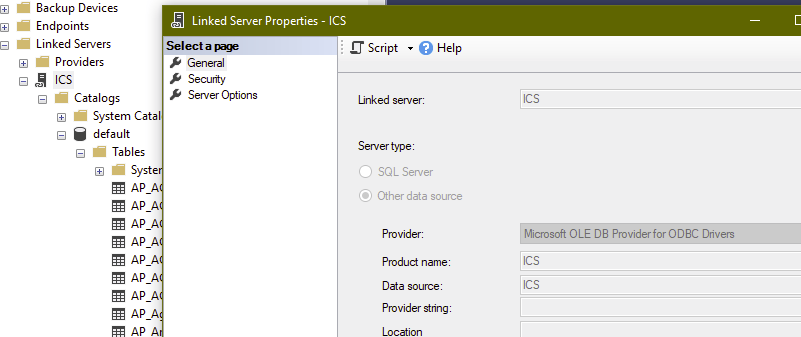
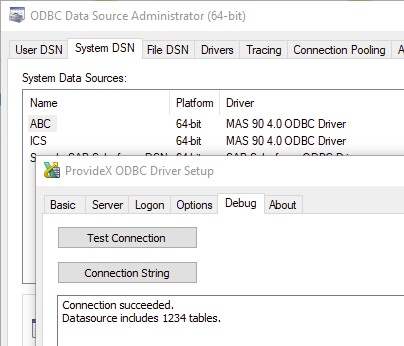
In ODBC 64-bit, in your System DSN that points to a specific Sage company, if you click on Debug tab \ Test Connection button, does it silently succeed (no typing company or credentials) with a positive table count? If that's good, then do you have the Linked Server configured for Provider = Microsoft OLE DB Provider for ODBC Drivers", Product Name = (your ODBC name), Data source = (your ODBC name), and set to "Be made without using a security context"?
Here's example screenshots from my machine:
------------------------------
Steve Iwanowski, NextStep Technology Advisors, aka DSD Lancaster PA ¯\_(ツ)_/¯