Got it....finally :) Thank you so much Kevin. Really appreciate your guidance.
TechnoClarity, Inc.
Original Message:
Sent: 07-31-2023 12:39
From: Kevin Moyes
Subject: Connecting Logicity (or any third-party) to Sage100 Premium
No. Give each user's domain account SQL read permissions.
Or even better, create a domain group, put the users that need to read Sage SQL data into that group, and use SSMS to give read permissions to the domain group.
If you have scheduled reports that needs access to SQL data, set up the Scheduled Task with a domain account that has SQL permissions.
------------------------------
Kevin Moyes
Technical Systems Analyst
Munjal White Consulting Co.
Toronto ON
------------------------------
Original Message:
Sent: 07-31-2023 12:27
From: Kenny Daniel
Subject: Connecting Logicity (or any third-party) to Sage100 Premium
OK, I think I understand now (I think...) So any user that wants to use Excel queries, needs to logon with that specific domain account. The other option is to add any user that needs queries to SQL. Am I understanding this correctly? Again, thank you so much for taking the time to explain to the slower ones in this group.
------------------------------
Kenny Daniel
TechnoClarity, Inc.
Original Message:
Sent: 07-31-2023 11:51
From: Kevin Moyes
Subject: Connecting Logicity (or any third-party) to Sage100 Premium
SQL using Windows authentication works the same way as accessing a network share.
Server: give permission to the domain account.
Workstation: user logs in as that domain account, and automatically has access to the network permissions that were set up.
Set up a "system" DSN using Windows Authentication (including default database), and the active Windows login is used by that DSN when accessing SQL. You don't hard-code credentials into the DSN... that's the point, the active Windows user's access token (validated by a domain controller) confirms the user identity and server permission for that identity determines whether they have access.
------------------------------
Kevin Moyes
Technical Systems Analyst
Munjal White Consulting Co.
Toronto ON
Original Message:
Sent: 07-31-2023 11:19
From: Kenny Daniel
Subject: Connecting Logicity (or any third-party) to Sage100 Premium
Thank you @Kevin Moyes. I'm not sure I understand. Setting up a domain user is not a problem. However, when I setup the Query on the user's PC and I choose Windows Authentication, it does not prompt for a user. I'm assuming it will authenticate with the user's credentials. How do I make it authenticate with the domain user credentials? My apologies for what is probably a silly question.
------------------------------
Kenny Daniel
TechnoClarity, Inc.
Original Message:
Sent: 07-31-2023 10:54
From: Kevin Moyes
Subject: Connecting Logicity (or any third-party) to Sage100 Premium
You need a domain for Windows Authentication to work properly. It has to be a Windows account that you can lookup in Active Directory then add to the SQL server. Local workstation accounts won't work.
Without a domain you could try local accounts on the SQL server, then map a drive to a random share on that server with alternate credentials. Or a single "SageDataReader" SQL login with a password that everyone knows / shares. With no domain, it's likely they don't care much about IT security.
------------------------------
Kevin Moyes
Technical Systems Analyst
Munjal White Consulting Co.
Toronto ON
Original Message:
Sent: 07-31-2023 10:15
From: Kenny Daniel
Subject: Connecting Logicity (or any third-party) to Sage100 Premium
@Kevin Moyes One more question if I may. For people doing Excel Queries, do you setup a SQL Login for each user? I assume when doing Excel Queries and using Windows Authentication, it will use the login credentials of the PC they are working on. Or do you have a better suggestion? Or Maybe I have no clue what I'm asking :)
TIA
------------------------------
Kenny Daniel
TechnoClarity, Inc.
Original Message:
Sent: 07-17-2023 11:14
From: Kevin Moyes
Subject: Connecting Logicity (or any third-party) to Sage100 Premium
We use Windows authentication in Premium DSN's for automated reporting.
SQL DSN's don't "remember" the password, and the application you use the DSN with needs to be able to pass it to the report runtime. Windows authentication works if you "run as" a Windows account that has read access to the SQL data.
------------------------------
Kevin Moyes
Technical Systems Analyst
Munjal White Consulting Co.
Toronto ON
Original Message:
Sent: 07-15-2023 20:22
From: Doug Higgs
Subject: Connecting Logicity (or any third-party) to Sage100 Premium
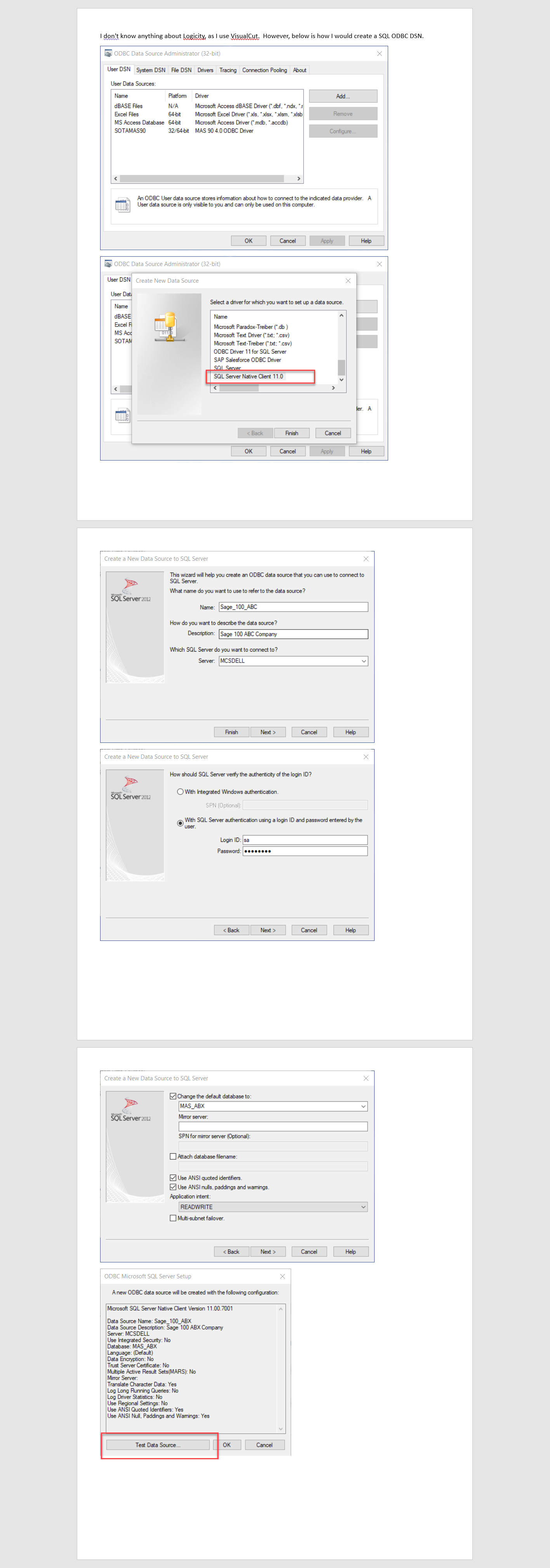
You don't need Sage 100 credentials. You are supplying the SQL sa password in the connection setup.
------------------------------
Doug Higgs
Midwest Commerce Solutions, Inc
(312) 315-0960
Chauffeur, Chef, and Personal Assistant to Sprinkles
Original Message:
Sent: 07-15-2023 20:13
From: Kenny Daniel
Subject: Connecting Logicity (or any third-party) to Sage100 Premium
Thanks Doug. I don't see anything about it being a silent connection. And it doesn't ask for Sage100 credentials anywhere. Is that normal?
---------------------------------
Kenny Daniel
TechnoClarity, Inc.
Original Message:
Sent: 07-15-2023
From: Doug Higgs
Subject: RE: Connecting Logicity (or any third-party) to Sage100 Premium
------------------------------
Doug Higgs
Midwest Commerce Solutions, Inc
(312) 315-0960
Chauffeur, Chef, and Personal Assistant to Sprinkles