Sage 100

 View Only
Expand all | Collapse all

Company Name in Crystal for v2019

  • 1.  Company Name in Crystal for v2019

    Posted 07-27-2022 19:20
    Its been a very long time since a customer requested the company name on the header of a crystal reports.
    SY_Company is not working anymore..... HELP!!!

    ------------------------------
    Lourdes Sobrino
    LU² DSD Puerto Rico
    Guaynabo Puerto Rico
    787.485.9638
    ------------------------------


  • 2.  RE: Company Name in Crystal for v2019

    Posted 07-27-2022 20:30
    Did it stop working?  Maybe your join is not quite right?

    ------------------------------
    Jeff Schwenk
    Bottomline Software, Inc.
    ------------------------------


  • 3.  RE: Company Name in Crystal for v2019

    Posted 07-27-2022 20:57
    How to add parameter fields like Company Code, Company Name, or Report Date to a custom Crystal Report

    ------------------------------
    Wayne Schulz
    wayne@s-consult.com
    Schulz Consulting
    (860) 516-8990
    Moodus, CT
    ------------------------------


  • 4.  RE: Company Name in Crystal for v2019

    Posted 07-27-2022 21:03
    I found that article..but in version 2019…the file SY_0CompanyParameters does not exits..at least in the MAS_System.  I tried with SY_Company and it did not work..

    ------------------------------
    Lourdes Sobrino
    LU² DSD Puerto Rico
    Guaynabo Puerto Rico
    787.485.9638
    ------------------------------


  • 5.  RE: Company Name in Crystal for v2019

    Posted 07-27-2022 21:42


    ------------------------------
    Wayne Schulz
    wayne@s-consult.com
    Schulz Consulting
    (860) 516-8990
    Moodus, CT
    ------------------------------


  • 6.  RE: Company Name in Crystal for v2019

    Posted 07-28-2022 08:06
    good morning,
    for premium go ahead and go back into Crystal reports when you go to expand your mas_company code you'll see that you have a folder called tables and a folder called views. Click on to the folder that says views. In there you will find the view file for SY_company. Add that to your report. That is where you'll find your fields that used to be in SY0_Parameter. If you need me you have my email and we can connect. Have a great day :-)

    ------------------------------
    Carmen Cruz
    Sage Consultant
    CompuData
    ------------------------------


  • 7.  RE: Company Name in Crystal for v2019

    Posted 07-28-2022 08:15
    Got it...thanks... I dont know why I could not find the file at first....

    ------------------------------
    Lourdes Sobrino
    LU² DSD Puerto Rico
    Guaynabo Puerto Rico
    787.485.9638
    ------------------------------


  • 8.  RE: Company Name in Crystal for v2019

    Posted 07-28-2022 10:03
    If you are adding the report to run from within Sage, there is an easier way.  Just look at how Sage forms get that data, and do the same.  Basically you create a specifically named formula, as a blank string (...= ""), and the value is passed in memory during printing.
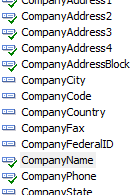
    And yes, this does work for custom reports, but you can't see it when working in CR designer.

    ------------------------------
    Kevin Moyes
    Technical Systems Analyst
    Munjal White Consulting Co.
    ------------------------------


  • 9.  RE: Company Name in Crystal for v2019

    Posted 07-28-2022 11:44
    What @Kevin Moyes said! You don't have to join any tables. Every single form will have several system wide formula values passed in at run-time including CompanyName. Additionally there are formula values passed in for the specific form. E.g. For a S/O some of them are:

    • Divisions - Means you don't have to check if Divisions are enabled it will just tell you
    • Category1Desc - Shows Category Desc 1 from Item Maint / Additional w/o having to join to CI_Item. Same for other 3 cats
    • Others too.
    Note these are passed in at run-time when you click Print/Preview ​so you cannot see the data ahead of time in the Crystal Reports designer but there are tricks for that too.​

    ------------------------------
    Alnoor Cassim

    Email: alnoor.cassim@90minds.com
    Ph:
    ------------------------------


  • 10.  RE: Company Name in Crystal for v2019

    Posted 10-27-2022 20:16
    So @Alnoor Cassim - when there is selection criteria on a standard report, like a date range or something, is there a way to get that on the report?​

    ------------------------------
    Beth Bowers
    (269) 358-0989
    ------------------------------


  • 11.  RE: Company Name in Crystal for v2019

    Posted 10-27-2022 21:00
    Beth - It depends on the report. On the A/R Aged Invoice Report for example, you can add a formula called AgingDate and set it = "" via Crystal syntax. Put that formula field on to the report and it will print the Aging Date from the report screen.

    ------------------------------
    Alnoor Cassim
    ------------------------------


  • 12.  RE: Company Name in Crystal for v2019

    Posted 10-28-2022 08:52
    Argh @Alnoor Cassim - is this one of those things where there is no documentation anywhere to determine what those little special formulas are?​

    ------------------------------
    Beth Bowers
    (269) 358-0989
    ------------------------------