Sage 100

 View Only
  • 1.  Combining two Picking Sheets

    Posted 11-15-2023 14:44

    HI All

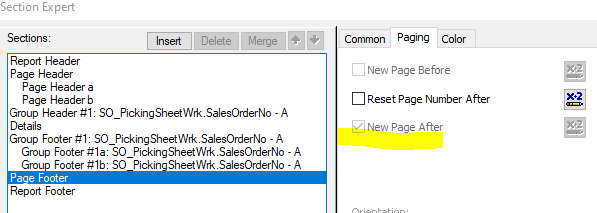
        I have a client that prints two versions on a picking sheet.  They want to print them both at once. I have created a form that just has two sub-reports that are the ones they want.   It works ok BUT I get the dreaded blank page at the end.  I have tried every trick I can think of but nothing suppresses it.   I have tried it in both group footers and page footers.  Currently I have it in two detail lines.  The main problem I see is that New Page after is checked and grayed out in both the Page Footer and Report Footer so I can't do anything with it.

      I considered doing one form with field suppression but the number of detail lines is not the same on each.  

    Any thoughts would be appreciated!


    ------------------------------
    Bob Osborn
    Consultant
    ACI Consulting
    ------------------------------


  • 2.  RE: Combining two Picking Sheets

    Posted 11-15-2023 14:49

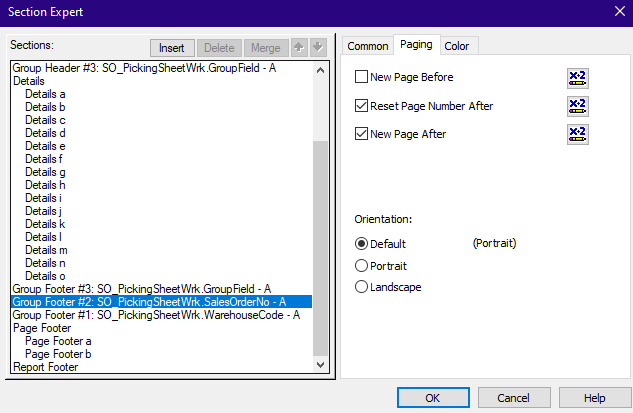
    Check the Group Footer...

    ...and perhaps try something with not onlastrecord type logic.  Be sure to fully suppress the Report Footer.  That should never be printed for a form.


    ------------------------------
    Kevin Moyes
    Technical Systems Analyst
    Munjal White Consulting Co.
    Toronto ON
    ------------------------------


  • 3.  RE: Combining two Picking Sheets

    Posted 11-15-2023 15:35

    Hi Kevin

      I believe the issue is with the Page Footer.  The "New Page After" is grayed out.  I have suppressed the page footer but I still get a blank page.


    Thank you,


    Bob Osborn

    ACI Consulting

    p 714.282.0378     f 714.282.0235


    Bob@ACIconsulting.com

     

     ACISignature1                  

    This communication, including attachments, is confidential and may contain proprietary information intended only for the proposed recipient. Please notify the sender and delete this message if you believe that you have received this message in error or if you are not the proposed recipient. Unauthorized disclosure, copying, or distribution of the information is strictly prohibited.


  • 4.  RE: Combining two Picking Sheets

    Posted 11-15-2023 15:40

    I think that is hard coded, and does not force a blank page.  Shrink page footer to take up no vertical space though, because I think CR reserves that amount of room at the bottom of the page, (regardless of suppression).

    Make sure your sub-reports do not have any "new page after" logic.


    ------------------------------
    Kevin Moyes
    Technical Systems Analyst
    Munjal White Consulting Co.
    Toronto ON
    ------------------------------


  • 5.  RE: Combining two Picking Sheets

    Posted 11-15-2023 15:02

    Look at File, Page Setup.  in the Page Options section, try checking the box  "Disassociate Formatting page Size.....".  Also, maybe the bottom margin is too large.  I always check the "No Printer" box in the Printer Options section.


    ------------------------------
    Doug Higgs
    Midwest Commerce Solutions, Inc
    (312) 315-0960
    Chauffeur, Chef, and Personal Assistant to Sprinkles
    ------------------------------