Sr. Consultant
Original Message:
Sent: 03-14-2024 08:38
From: Brett Zimmerman
Subject: Client upgrade from 2016 Advanced to 2023.2 with current Starship (no upgrade to Starship)
And just fyi, I had received that above resolution from Abel Gonzalez in StarShip Support last May. Also, coincidentally just yesterday I had a client who apparently has been dealing with this for a year since their last Upgrade but then never said anything to us. Just waiting for confirmation that it worked for them.
------------------------------
Brett Zimmerman
Net at Work
Greater Boston Area
------------------------------
Original Message:
Sent: 03-14-2024 08:32
From: Brett Zimmerman
Subject: Client upgrade from 2016 Advanced to 2023.2 with current Starship (no upgrade to Starship)
Try this:
This may require users to exit Sage 100.
In Sage 100 under S/O Shipping Setup Options > Entry tab:
- Uncheck 'Use StarShip Freight amount for Invoice', Accept/save, close screen.
- Then go back in and re-enable that setting, Accept/save, close.
------------------------------
Brett Zimmerman
Net at Work
Greater Boston Area
Original Message:
Sent: 03-13-2024 17:48
From: Barbara Goldstein
Subject: Client upgrade from 2016 Advanced to 2023.2 with current Starship (no upgrade to Starship)
Their setting is "Yes", but it was in 2016, as well. I can try setting it to "No: and see if results differ.
------------------------------
Barbara Goldstein
Sr. Consultant
DSD Business Systems
Original Message:
Sent: 03-13-2024 17:33
From: Kevin Moyes
Subject: Client upgrade from 2016 Advanced to 2023.2 with current Starship (no upgrade to Starship)
Be careful with FreightAmt values potentially being overwritten, when this SO option is set to anything other than "No".
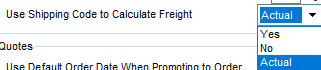
If SS pushes the freight amount before line quantities are set, Sage will recalculate the FreightAmt (usually to zero), making it look like SS didn't send the data.
(I have not seen this with SS, but I have banged my head against this particular wall for freight amounts being reset in other ways).
Edit:
Related Mod Squad Idea, already submitted to Sage.
https://community.90minds.com/idea/so-allow-editing-of-ship-via-codes
------------------------------
Kevin Moyes
Technical Systems Analyst
Munjal White Consulting Co.
Toronto ON