They don;t have those options. Looks like they are on too old of a version. They are due for a Sage 100 upgrade this summer so the good news is that click to pay for statements is available for the newer versions. A nice value add when presenting upgrade pricing options.
------------------------------
Doug Higgs
Midwest Commerce Solutions, Inc
(312) 315-0960
Chauffeur, Chef, and Personal Assistant to Sprinkles
------------------------------
Original Message:
Sent: 03-28-2023 11:31
From: Kevin Moyes
Subject: Clcik to Pay for Customer Statements
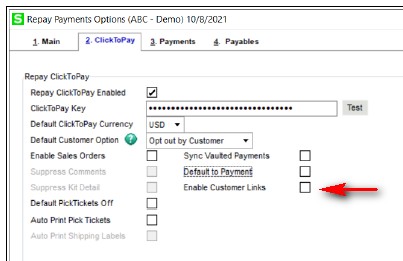
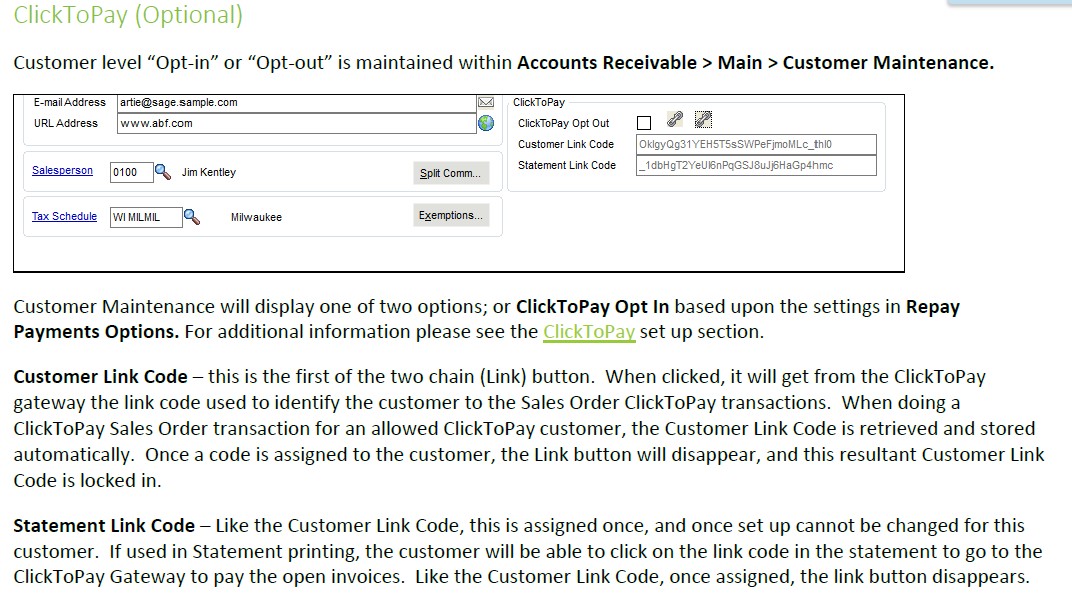
It will depend on the version of repay installed. Earlier versions didn't have that feature. If you don't see these options in the customer settings / panel, then you will need to at least upgrade Repay (assuming they have an installer for v2019).
------------------------------
Kevin Moyes
Technical Systems Analyst
Munjal White Consulting Co.
------------------------------
Original Message:
Sent: 03-28-2023 11:24
From: Doug Higgs
Subject: Clcik to Pay for Customer Statements
@Eric Lunceford I have that setup guide and I don't see any information on how to insert a link into a statement. There is information on click to pay links for invoices but not statements. This end user is on Sage 100 v2019 so not sure if click to pay statements are even available. I opened a case with Repay.... first tech support person did not know. It is being escalated. Seems like a basic question.
------------------------------
Doug Higgs
Midwest Commerce Solutions, Inc
(312) 315-0960
Chauffeur, Chef, and Personal Assistant to Sprinkles
Original Message:
Sent: 03-28-2023 11:00
From: Eric Lunceford
Subject: Clcik to Pay for Customer Statements
Does this help?
------------------------------
Eric Lunceford
First Mate Business Solutions
Oklahoma City, OK
877-880-8960