From what i can gather looking at available object classes and playing with a few things, there isn't actually a framework level object class to maintain the data in IM_ItemMemoSettings. The SY_MemoHandler_Bus and IM_ItemMemo_Bus class objects only appear to work with the IM_ItemMemo table. SY_MemoHandler_Bus does have a method to return a file channel for the IM_ItemMemoSettings table but the reads and writes appear to be done using legacy level code instead of framework level code.
Now i was able to set up a VI import with the following settings and using some perform logic, I was able to write or update records in IM_ItemMemoSettings.
Here is what the VI import looks like. I am using IM_ItemMemo as the table only as a place holder since some of the field names are similar to those in IM_ItemMemoSettings and will avoid field related errors. Doing it this way also avoids having to use DD to modify the IM_ItemMemoSettings table.
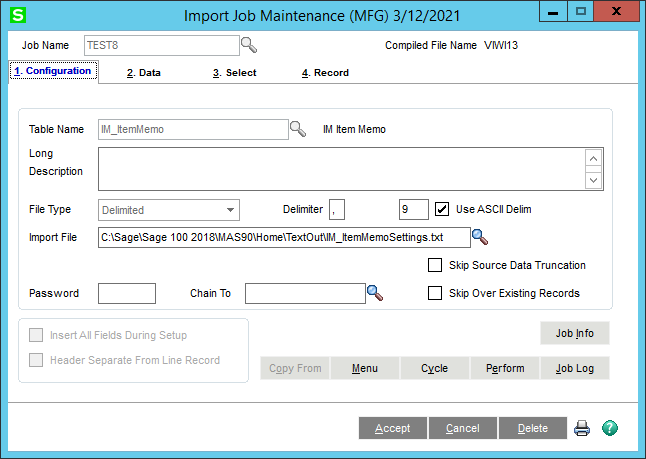
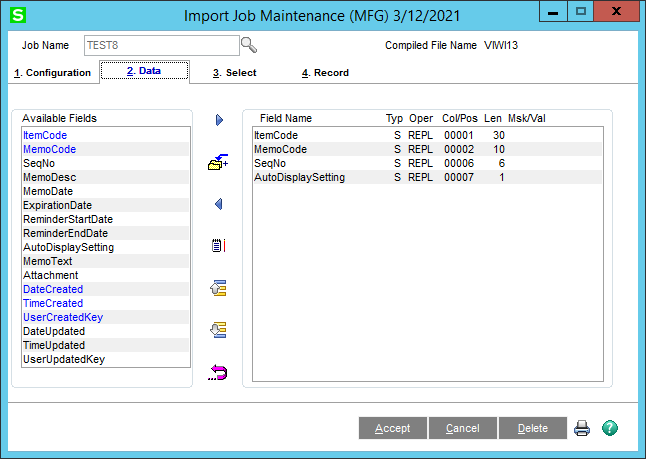
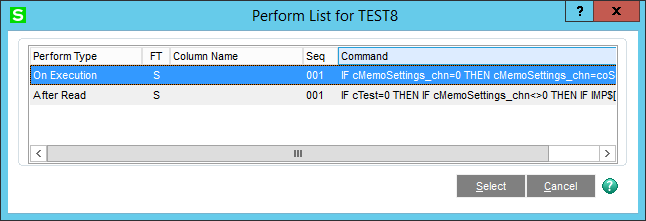
Here is the perform logic for the On Execution perform type. This is checking to see if the file channel for the *MemoSettings table is valid. If it isn't, it uses the tables main name plus "Settings" to open a file channel, this allows the perform logic to be used for other memo tables easily since there appears to be a "Settings" table for each "Memo" table.
IF cMemoSettings_chn=0 THEN cMemoSettings_chn=coSession'FileObj'Open(coBusiness'GetTable$("Main")+"Settings", pthCompany$) END_IF ! '
If you want to make sure you are only updating existing records, use the following perform logic for the After Read perform type.
IF cTest=0 THEN IF cMemoSettings_chn<>0 THEN IF IMP$[1]<>"" AND IMP$[2]<>"" AND IMP$[3]<>"" AND IMP$[4]<>"" AND IMP$[5]<>"" AND IMP$[6]<>"" AND IMP$[7]<>"" THEN UPDATE(cMemoSettings_chn, ERR=*PROCEED)IMP$[1],IMP$[2],IMP$[3],IMP$[4],IMP$[5],IMP$[6],IMP$[7] END_IF END_IF END_IF ! '
If you want to update existing records and write new records, use the following perform logic for the After Read perform type.
IF cTest=0 THEN IF cMemoSettings_chn<>0 THEN IF IMP$[1]<>"" AND IMP$[2]<>"" AND IMP$[3]<>"" AND IMP$[4]<>"" AND IMP$[5]<>"" AND IMP$[6]<>"" AND IMP$[7]<>"" THEN WRITE(cMemoSettings_chn, ERR=*PROCEED)IMP$[1],IMP$[2],IMP$[3],IMP$[4],IMP$[5],IMP$[6],IMP$[7] END_IF END_IF END_IF ! '
This was tested with the following tab delimited data. This is all seven fields from the IM_ItemMemoSettings table in order and the perform logic above expects the data to be in this same exact order. If you are exporting the data from IM_ItemMemoSettings, the data should be in the correct order. If you have to, you can change the number in between the brackets to indicate the column number but i would recommend keeping them in the order they appear and use the UPDATE perform logic to avoid any invalid records being written. Both the UPDATE and WRITE perform logic check to see if you are "testing" the import and will not make any changes if you are. They also check to make sure all seven columns in the source file are not blank. Keep in mind though that because the table being imported into doesn't have additional fields, you will not see the changes written to the VI log and in the case where the item code, memo code, and sequence are repeated in the source file, they will always update the one record in the "Memo" table, in this example, IM_ItemMemo, so with the sample data below, the VI log will only say one record was processed.
3/4-SCREW FREIGHT I/M 01 BM_BILLINQUIRY_UI 000000 N
3/4-SCREW FREIGHT I/M 01 BM_BILL_UI 000000 N
------------------------------
David Speck II
Tennessee Software Solutions
------------------------------
Original Message:
Sent: 03-12-2021 08:21
From: Madeline Stefanou
Subject: Change Item Memo Settings (Pop Ups)
I'm trying to change the setting in IM_ItemMemoSettings. Let me look through your notes from that post to see if I can work through this change. Thank you!
------------------------------
Madeline Stefanou
RKL eSolutions, LLC
------------------------------
Original Message:
Sent: 03-12-2021 00:43
From: David Speck II
Subject: Change Item Memo Settings (Pop Ups)
If you are referring to updating records in the screenshot below, then you need to import into IM_ItemMemo.
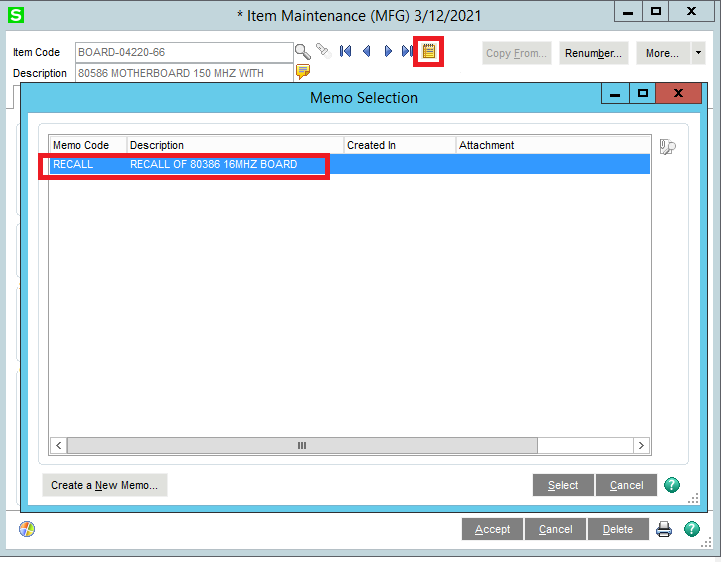
If you are referring to updating records in the screenshot below, then you would need to import into GL_CompanyMemoManagerSettings however you can't do this with VI Import without first modifying the data dictionary. See this thread for more details. Possible to VI into Memo Manager Maintenance? | Sage 100 (90minds.com)
------------------------------
David Speck II
Tennessee Software Solutions