I haven't messed with Edge to try leveraging automation like you can with IE yet. However, I suppose you could always write the results to a temporary html file in the MAS90/Home/Textout folder using the user code and a date and time stamp, similar to a report work table and then use oScript.Execute with the Invoke directive to open the html file. This works on Advanced and Standard and uses the client's default application to open the file. I can link to them right now but I have examples on SageCity and maybe here as well on how to use the Invoke directive.
On a final note, with IE being sunsetted, I wonder what that means for HTAs...
------------------------------
David Speck II
Tennessee Software Solutions
------------------------------
Original Message:
Sent: 06-19-2021 22:33
From: Dan Burleson
Subject: Button to Open UDT from Repetitive Invoice Header
Using a button script with variables from the current panel, I read tables from the ODBC and put up a bare Internet Explorer window with a table for the results in a grid layout. However, Microsoft has signed the death warrant for IE as of June next year. At this point I haven't found any documentation on how Edge can work as nimbly nor capably as IE. What then?
------------------------------
Dan Burleson
Software Consultant
Connex Software
Corvallis OR
541-224-6642
------------------------------
Original Message:
Sent: 06-19-2021 12:09
From: David Speck II
Subject: Button to Open UDT from Repetitive Invoice Header
You could read what you need to from the UDT and display the results in an IE window so you have more control over the layout and formatting but if you just want to use the UDT maintenance panel, then you'll need to resort to two scripts;
- Your button script that determines the filter and gets a handle to the CM_UDTMaint_UI class and calls its Process method and pass in two arguments, the first is the target UDT's name and the second is the filter you want to apply, creating this filter requires knowledge of how Sage 100 typically builds filters / where clauses. Usually they wrap the field name in the ProvideX UCS function which converts it to uppercase and then compare it against the literal value also wrapped in the UCS function. So the Process method call could look like this, you will need to correct the actual UDT name and the field names used in the filter.
-
CM_UDTMaint_UI.Process "AR_UDT_REP_INV_EXT_INFO", "UCS(UDF_ARDivisionNo$)=UCS(""01"") AND UCS(UDF_CustomerNo$)=UCS(""ABC"") AND UCS(UDF_ReferenceNo$)=UCS(""0001"")"
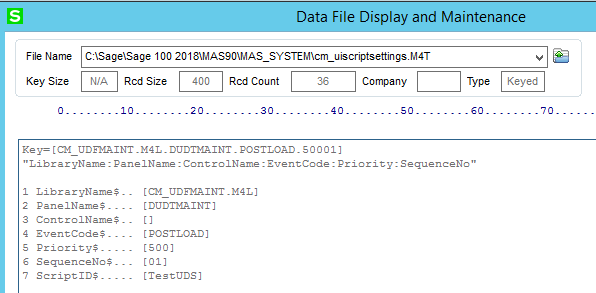
- A UI Post Load script on the CM_UDFMAINT.M4L library and DUDTMAINT panel. In order to achieve this, you have to first assign your script to another panel that you can access via Customizer then DFDM CM_UIScriptSettings and change the LibraryName$ to "CM_UDFMAINT.M4L" and the PanelName$ to "DUDTMAINT". Both MUST be uppercase. When prompted to remove the old key when changing each field, assuming you don't want to leave the record for the temporary panel you assigned it to, click Yes. In this script, you will be checking that the table is the intended target table and that there is a value in the ARG_2$ variable, which is what you would passed into the second argument when calling the Process method. This script takes your filter and sets it in the UDT's business object's UDTWhereClause property which is what the accompany UI object uses when filtering the rows. Make sure you correct the UDT name compared on line 3.
-
If IsObject(oUIObj) Then If IsObject(oBusObj) Then If UCase(oBusObj.GetTable("Main")) = UCase("AR_UDT_REP_INV_EXT_INFO") Then Arg_2 = "" : oUIObj.GetValue "Arg_2$", Arg_2 If Arg_2 <> "" Then oBusObj.UDTWhereClause = Arg_2 GD_Main_Ctl = 0 : oUIObj.GetValue "GD_Main.Ctl", GD_Main_Ctl If GD_Main_Ctl <> 0 Then oUIObj.ClearGrid GD_Main_Ctl oUIObj.LoadGrid GD_Main_Ctl End If End If End If End IfEnd If
Make sure to delete the *.M4L.vbs file that was created in MAS90\CM\Script for the temporary panel and then make sure you recompile UI scripts.
The downside to this is that the UDT will first load up to 100 rows before the UI post load script is triggered. I had attempted to filter the UI objects business object before calling the process method but unfortunately, the CM_UDTMaint_UI class won't initiate the business object until its Process method is called and the first argument must be a valid UDT and when the Process method is called, it resets all variables to default values along with the business object's UDTWhereClause property. I even tried a table post read event script thinking it would fire on the first record read but it didn't actually fire until after all rows were loaded and I clicked on a row.
FYI, this is what the record in CM_UIScriptSettings should look like, you can of course modify the Priority$ and ScriptID$ to suit your needs.
------------------------------
David Speck II
Tennessee Software Solutions
Original Message:
Sent: 06-18-2021 16:29
From: Kevin Moyes
Subject: Button to Open UDT from Repetitive Invoice Header
For reading? Have a validated UDF in the header table (value = UDT key... maybe script this to set automatically), then have a pop-up panel to show the linked UDT data.
(I agree, the UDT maintenance interface is so messy... with the search window often very buggy... if someone knows a way to pre-filter that would be great to know).
------------------------------
Kevin Moyes
Technical Systems Analyst
Munjal White Consulting Co.
Toronto ON