Sage 100

 View Only
  • 1.  Business Insights Explorer Panel Mucked up

    Posted 07-01-2019 11:36
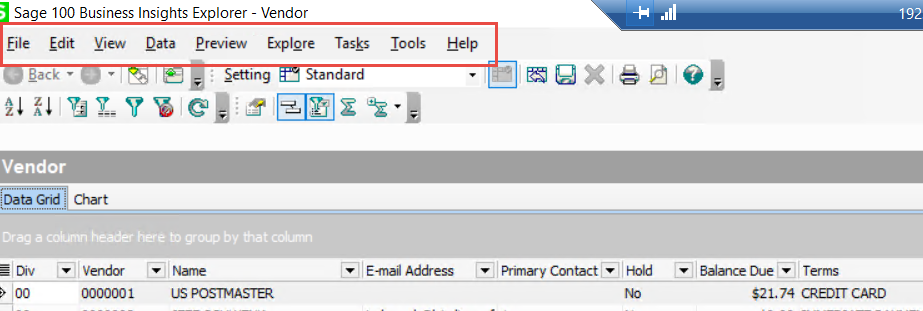
    Client clicked on something(?) and now the look of the BIE panel has changed.  See the difference between the top panel (is) and the bottom panel (should be).

    Anyone run into this?  What was your fix?  TIA.
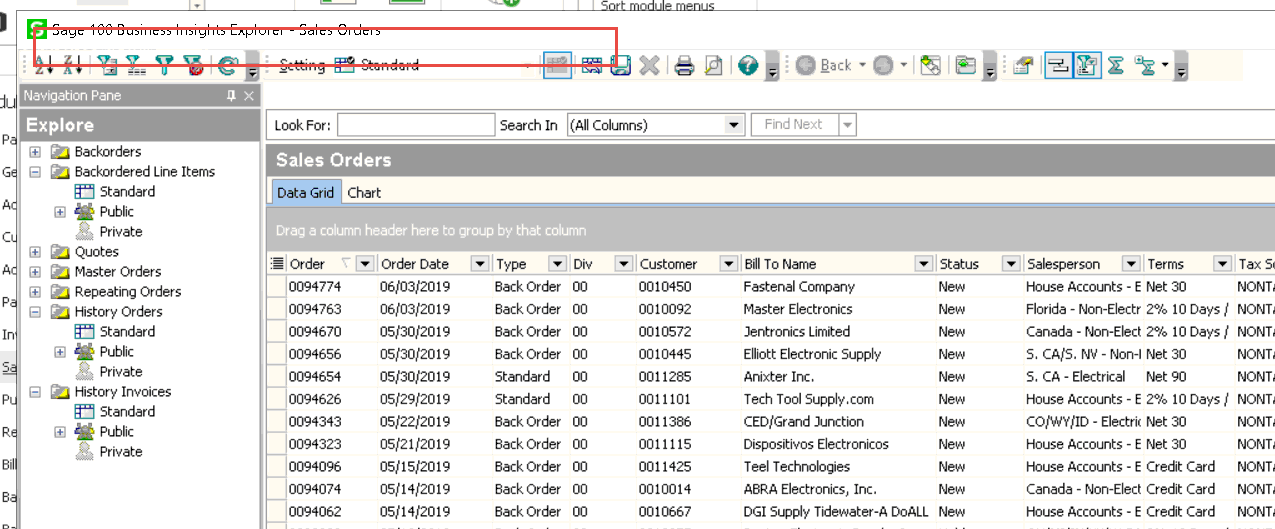


    The way it was and wanted again


    ------------------------------
    Jeff Schwenk
    FORMER 90M Board Member
    Bottomline Software, Inc.
    Waynesboro VA
    540-221-4444
    ------------------------------


  • 2.  RE: Business Insights Explorer Panel Mucked up

    Posted 07-01-2019 11:49
    Another interesting tid bit.

    Client's customize panel has the main menu deselected while another user's panel that displays properly is selected.  Where is the master switch for this as it is grayed out for both users?


    ------------------------------
    Jeff Schwenk
    FORMER 90M Board Member
    Bottomline Software, Inc.
    Waynesboro VA
    540-221-4444
    ------------------------------


  • 3.  RE: Business Insights Explorer Panel Mucked up

    Posted 07-01-2019 12:31
    Maybe try hitting the RESET button?

    Other thing I can think of is to try toggling the desktop between Standard and Classic in User Settings?  I'm amazed at the unusual things that can fix.

    ------------------------------
    Thomas Rogers (TomTarget)
    Target System Technology, Inc.
    Spokane Valley WA
    ------------------------------


  • 4.  RE: Business Insights Explorer Panel Mucked up

    Posted 07-01-2019 12:40
    I'm with Tom - I have a customer who tried to use BIE when they had the standard UI and experienced issues. I am not sure whether they resolved this. I think Sage had  KB entry on the problem but can't recall the resolution unless it was to "use classic UI".

    ------------------------------
    Wayne Schulz - Schulz Consulting - 860-516-8990
    ------------------------------


  • 5.  RE: Business Insights Explorer Panel Mucked up

    Posted 07-01-2019 12:42
    Close but no cigar.  Changing views had no impact.  Surprisingly, the view was the same.  I would have put money down that it would be different

    ------------------------------
    Jeff Schwenk
    FORMER 90M Board Member
    Bottomline Software, Inc.
    Waynesboro VA
    540-221-4444
    ------------------------------


  • 6.  RE: Business Insights Explorer Panel Mucked up

    Posted 07-01-2019 13:48
    Jeff, did someone drag the missing toolbar? I think I see it in the line below.  The one that has BACK as the first button?

    ------------------------------
    ==================
    Rhonda McNamara
    Customer Success Manager
    Stewart Technologies, Inc.
    rsm@stewarttechnologies.com
    ------------------------------


  • 7.  RE: Business Insights Explorer Panel Mucked up

    Posted 07-01-2019 17:27
    Try the More Button in the upper right?


    ------------------------------
    Greg Stiles
    S & W Microsystems
    Torrance CA
    310.787.1010
    ------------------------------