Yeah, I saw that, too, and figure it works fine on all the OTHER parts of the menu - just not this part. Which really shouldn't be able to be "disappeared"...
------------------------------
Beth Bowers
(269) 358-0989
------------------------------
Original Message:
Sent: 01-06-2023 08:24
From: Brett Zimmerman
Subject: Business Insights Explorer missing top menu
Found this KB although it doesn't appear to be of much further help:
Business Insights menu is missing
Created on 06-07-2021 / Last modified on 07-12-2021
Summary
Business Insights Explorer views only show data, no menu options.
Cause
Menu options have been de-selected or are hidden.
Resolution
- Open any view in Business Insights Explorer
- Right-Click the panel title
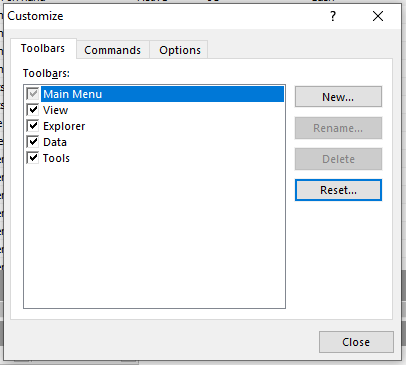
- Click Customize
- Make changes to the options in this window as needed
Keywords
------------------------------
Brett Zimmerman
Net at Work
Greater Boston Area
------------------------------
Original Message:
Sent: 01-06-2023 08:20
From: Brett Zimmerman
Subject: Business Insights Explorer missing top menu
Or try hitting your Alt key and then down-arrow as that may display the File menu drop-down.
------------------------------
Brett Zimmerman
Net at Work
Greater Boston Area
Original Message:
Sent: 01-06-2023 08:17
From: Brett Zimmerman
Subject: Business Insights Explorer missing top menu
It doesn't appear you can simply get rid of it as per the grayed-out checkbox, so maybe it got moved somewhere/hidden. I suppose you could try the below 'Reset' button.
------------------------------
Brett Zimmerman
Net at Work
Greater Boston Area