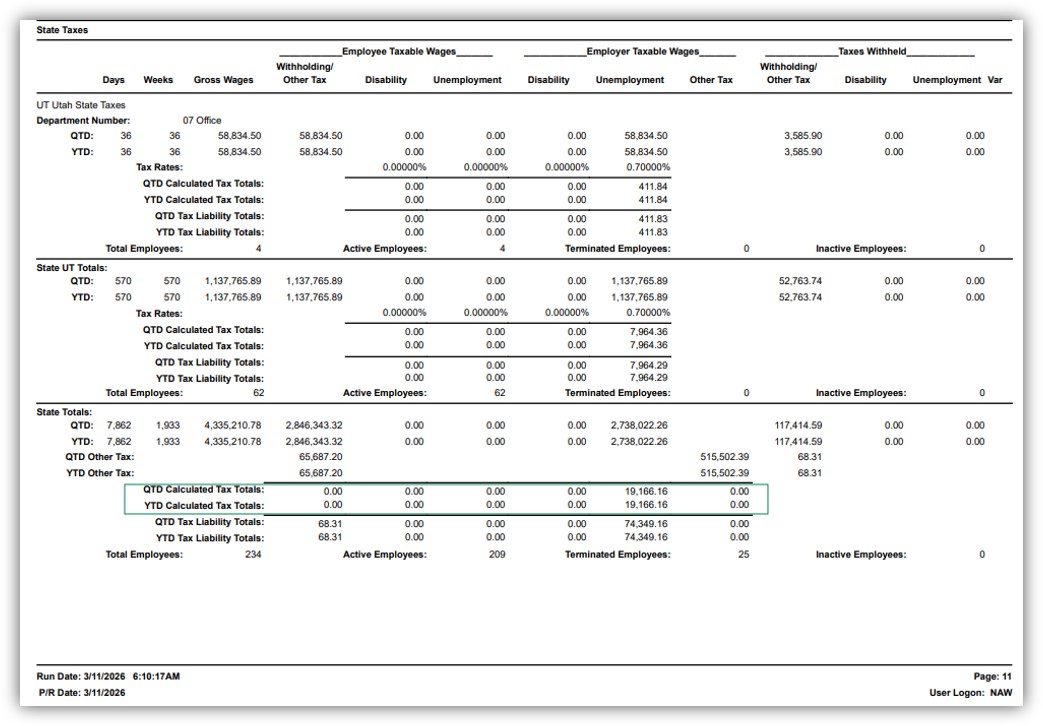
There appears to be a bug in the P/R Quarterly Tax Report upon installing P/R 2.26: bad group footer suppression formula (GF1g) causes section not to show (the green-boxed area in below screenshot is what suppresses).
So it seems you just need to remove the C value from the formula. Thanks.
In v2025 before installing P/R 2.26:
|
'Report Section Values
|
|
' A = Federal Taxes
|
|
' B = Federal Taxes - Tip Earnings
|
|
' C = State Taxes
|
|
' D = State Taxes - Tip Earnings
|
|
' E = Local Taxes
|
|
' F = Local Taxes - Tip Earnings
|
|
|
|
formula = {PR_QuarterlyTaxReportWrk.ReportSection} = array("B", "D", "F")
|
In v2025 after installing P/R 2.26:
|
'Report Section Values
|
|
' A = Federal Taxes
|
|
' B = Federal Taxes - Tip Earnings
|
|
' C = State Taxes
|
|
' D = State Taxes - Tip Earnings
|
|
' E = Local Taxes
|
|
' F = Local Taxes - Tip Earnings
|
|
|
|
formula = {PR_QuarterlyTaxReportWrk.ReportSection} = array("B", "C", "D", "F")
|
Fyi, this is the formula in v2022 before Upgrading to v2025 and P/R 2.26:
|
'Report Section Values
|
|
' A = Federal Taxes
|
|
' B = Federal Taxes - Tip Earnings
|
|
' C = State Taxes
|
|
' D = State Taxes - Tip Earnings
|
|
' E = Local Taxes
|
|
|
|
formula = {PR_QuarterlyTaxReportWrk.ReportSection} = array("B", "D")
|
------------------------------
Brett Zimmerman
Net at Work
Greater Boston Area
------------------------------