Sage 100

 View Only
  • 1.  BOM Revisions with SO Entry

    Posted 25 days ago

    Help!

    Need some 'splainin regarding the functionality of the revisions field in SO entry.

    HOW is it supposed to work?

    I have set up an inventory test item with a related BOM.

    The BOM is set up as a kit.  I have three revisions to this BOM.

    The person working on a third-party app is adamant that during SO entry, thinks he should be able to select which revision (via a dropdown) to use.  He cannot so he thinks it is a security issue.  I am testing under my user login (FULL access) and I am unable to select which revision.

    Per the help text, the BOM must be configured as a KIT, not a STANDARD BOM.

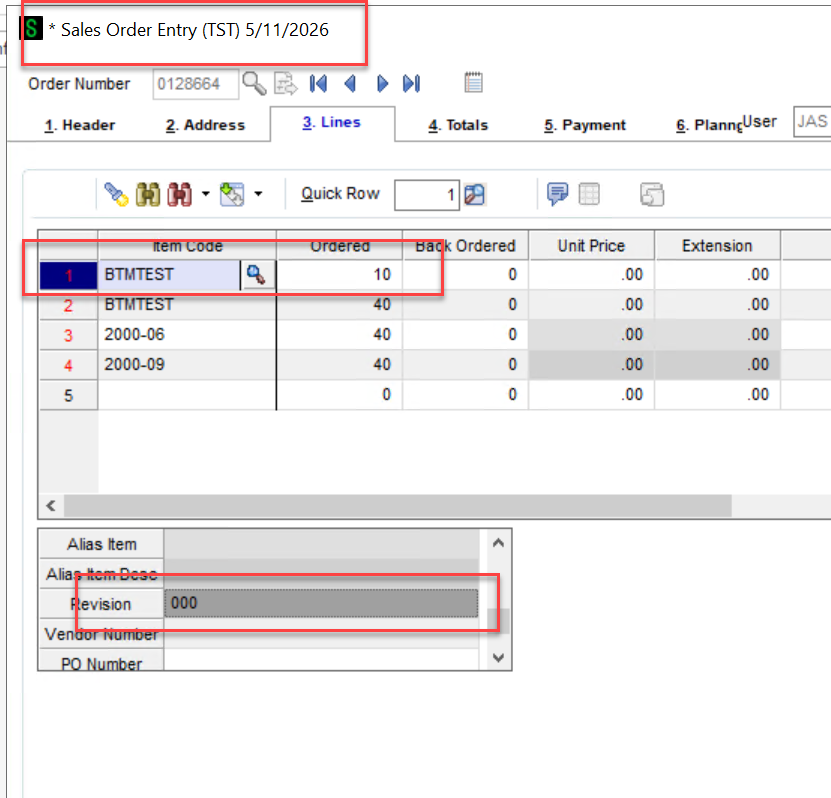
    Revision - This field displays the revision selected for a Bill of Materials kit at the time this order is entered and can only be viewed. This field is available only if the Inventory Management module is integrated with Sales Order, the Bill of Materials module is set up, and revision tracking is enabled in Bill of Material Options.

    Could someone explain how the program is supposed to work?  Does it open up if you have the PM module?  Or is the consultant delusional about how Sage works?

    TIA


    ------------------------------
    Jeff Schwenk
    Owner
    Bottomline Software, Inc.
    Waynesboro VA
    (540) 221-4444

    Improving bottom lines for over 25 years!
    ------------------------------


  • 2.  RE: BOM Revisions with SO Entry

    Posted 25 days ago

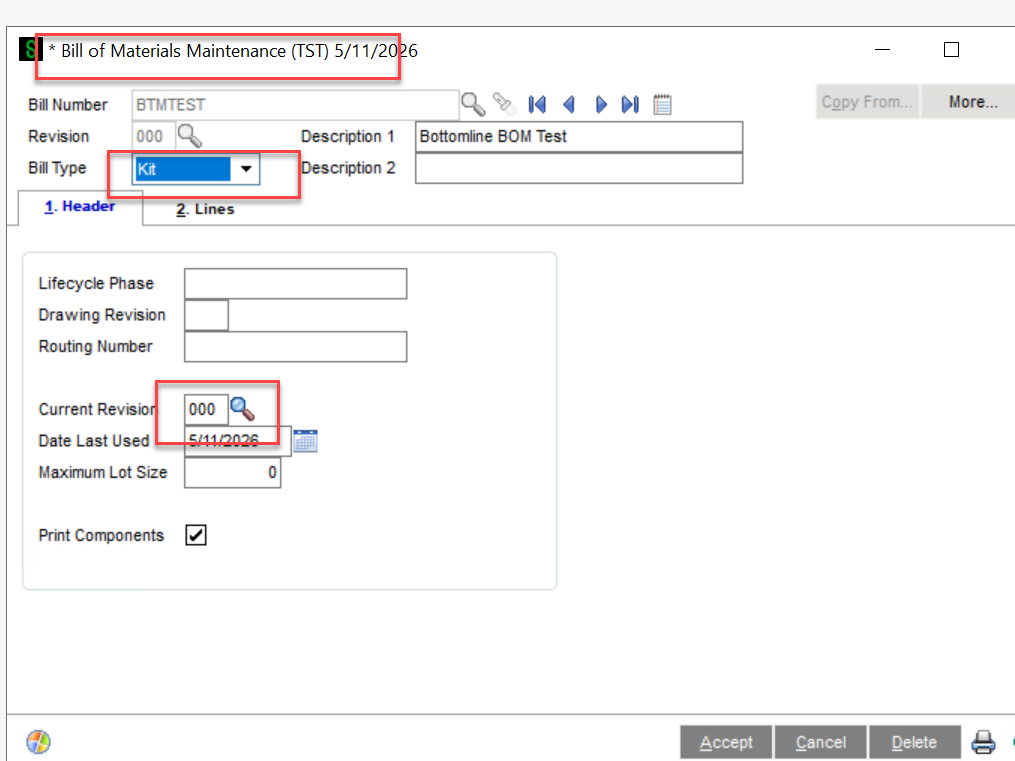
    I think it's how the word circled below is being interpreted. I believe Sage means in Bill Maintenance, what is the CURRENT REVISION field set to for that item. I just tested with 2 revisions of item KIT.  When I changed the CURRENT REVISION field on BOTH revisions to 001, it defaulted to 001 in data entry. Otherwise, it was 000. And the field was NOT available for modification either way.  (Also, when I changed the Current Revision on the 001 version to 001 it asked if I wanted to change that field for all revisions and I said Yes, but it did NOT change the Current Revision for revision 000, which I think feels like a bug.)

    I think OPTIONS are the only thing you can select during data entry in Sales Order


    ------------------------------
    Beth Bowers
    Dog Mom, first and foremost. The rest is all just necessary to keep the dogs in biscuits.
    (269) 358-0989
    ------------------------------


  • 3.  RE: BOM Revisions with SO Entry

    Posted 25 days ago

    The user absolutely "SHOULD" be able to change the Revision when putting a Sales order in. However, it just does not work that way even with Production Management. That is a pretty big miss in my opinion.


    I did find a DSD Enhancment SOBR BOM Revisions enabled in Sales order for KIT items. Here is a link to that enhancement. DSD Business Systems


    **************

    Don't miss out on the 2026 Basic Crystal Reports for Sage 100 Online Training: View the details


    Join us for the 2026 Intermediate Crystal Reports for Sage 100 Online Training: View the details


    David Overholt

    DWD Technology Group, Inc.

    9921 Dupont Circle Drive West, Suite 300 | Fort Wayne, IN 46825

    260.423.2414 main

    260.399.8655 Direct

    800.232.8913 toll free

    sagesupport@dwdtechgroup.com

    www.dwdtechgroup.com


  • 4.  RE: BOM Revisions with SO Entry

    Posted 24 days ago

    Sage only recognized a current revision when doing any and all transactions.  The user does not have control to pick and choose from the existing revisions.  What it sounds like to me is that they have multiple "versions" of the same item and want to pick and sell the specific version.  Although not available for Sales Kits, they could consider Option BOM's.  Then during Sales Order Entry, the user selects the Item Code (BOM) and the various options available come up to choose from.  They would then have to "produce" the item, either with a BOM Production Entry or with a Work Ticket (PM or OM).  Probably easiest for them to establish the item code as three different part numbers.  Or to use the add on suggested above. 


    ------------------------------
    Madeline Stefanou
    Sr. Solution Consultant
    RKL eSolutions, LLC
    LANCASTER PA
    717.208.3117
    ------------------------------


  • 5.  RE: BOM Revisions with SO Entry

    Posted 24 days ago

    I wanted to share some additional insight based on a client we worked with who needed the ability to select different revisions for an item during Sales Order entry. Their process involved updating the revision each year when a new "model year" was released, which also meant pricing for the item changed depending on the revision. When a new model year came out, they updated the current revision field on the BOM so that sales orders would default to the latest revision. However, they still needed to offer prior-year versions, and it was important for them to specify which revision was being sold-plus have the correct price come in automatically.

    To tackle this, we got creative. We added a User Defined Field (UDF) to the Sales Order entry grid specifically for the revision. Then we implemented scripting so that whenever the user changed the revision value on the order, the script would go out, find the appropriate price for that item and revision, and bring it in on the fly. This allowed them to easily manage multiple revisions and keep pricing accurate without manual intervention.

    I don't remember if the script changed the standard revision field, I think we just ignored that and used the UDF on all printouts etc.  Everything was serialized for this client. 

    Hope this helps anyone facing similar challenges or looking for ways to provide flexibility with revisions and pricing in Sales Order Entry.


    ------------------------------
    David Overholt
    Programmer/Project Manager
    DWD Technology Group
    Fort Wayne IN
    (260) 399-8655
    ------------------------------


  • 6.  RE: BOM Revisions with SO Entry

    Posted 24 days ago

    v2026 allowing 15 digits for Price Level should help with the pricing side of that problem.


    ------------------------------
    Kevin Moyes
    Technical Systems Analyst
    Munjal White Consulting Co.
    Toronto ON
    ------------------------------