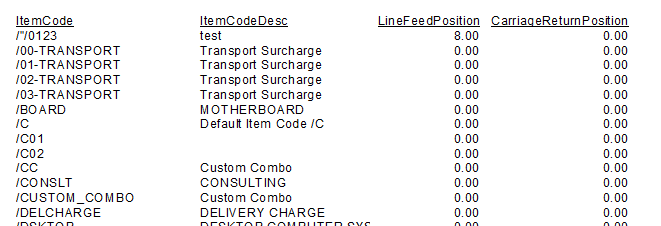
Someone likely copied a cell from Excel and pasted it in, at least, that is how that happened at several of the clients that I have troubleshooted this for. Check instead using InStr and searching for Chr(13) or Chr(10), I suspect it will be the Chr(10). So you can create two formulas, one to locate the position of each in the item code.
InStr({CI_Item.ItemCode}, Chr(10))
Here is an example of an item code being forced in with a line feed and the two formulas used to look for either. You can then use either formula in a record or group selection checking if they are greater than 0.
------------------------------
David Speck II
Tennessee Software Solutions
------------------------------
Original Message:
Sent: 03-07-2022 09:13
From: Lee Graham
Subject: Blank Characters at the end of CI_ITEM Item Code field
Do you know how they got in those item #'s? Import? Something may create more as you delete those existing ones.
------------------------------
Lee Graham
Friendly Systems, Inc.
------------------------------
Original Message:
Sent: 03-07-2022 08:13
From: Lourdes Sobrino
Subject: Blank Characters at the end of CI_ITEM Item Code field
By the way...it is not literaly a blank .... it is the ß code....
------------------------------
Lourdes Sobrino
LU² DSD Puerto Rico
Guaynabo Puerto Rico
787.485.9638
Original Message:
Sent: 03-07-2022 08:10
From: Lourdes Sobrino
Subject: Blank Characters at the end of CI_ITEM Item Code field
It DOES NOT bring the blanks at the end of the item code....good try...thanks
------------------------------
Lourdes Sobrino
LU² DSD Puerto Rico
Guaynabo Puerto Rico
787.485.9638
Original Message:
Sent: 03-07-2022 07:36
From: Phil McIntosh
Subject: Blank Characters at the end of CI_ITEM Item Code field
I would think so. You could create one you know has blanks at the end as a test.
------------------------------
Phil McIntosh
President
Friendly Systems, Inc.
Asheville NC
678.273.4010 ext 5
Original Message:
Sent: 03-07-2022 07:22
From: Lourdes Sobrino
Subject: Blank Characters at the end of CI_ITEM Item Code field
Thanks Phil...that gave me the ones with spaces at the beginning of the field....would it also get the ones that have them at the end of the field??? Just wondering....
------------------------------
Lourdes Sobrino
LU² DSD Puerto Rico
Guaynabo Puerto Rico
787.485.9638
Original Message:
Sent: 03-06-2022 19:06
From: Phil McIntosh
Subject: Blank Characters at the end of CI_ITEM Item Code field
@Lourdes Sobrino - If you uncheck "Strip Trailing spaces" in the ODBC setup you should be able to check with Crystal Suggestion for formula: If Len(ItemCode) <> Len(Trim(ItemCode))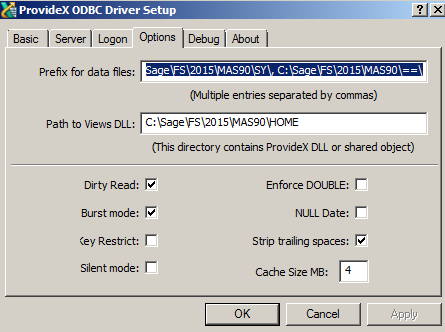
------------------------------
Phil McIntosh
President
Friendly Systems, Inc.
Asheville NC
678.273.4010 ext 5