Sage 100

 View Only
  • 1.  Bartender Label Printing V11.2\168664 64 Bit- Tricks to connecting to Access DB??

    Posted 07-15-2021 10:28
    Client upgraded to newer version of Bartender Label software.  Connecting the label template to the Sage DB via an Access db with pass thru queries is quite the challenge.

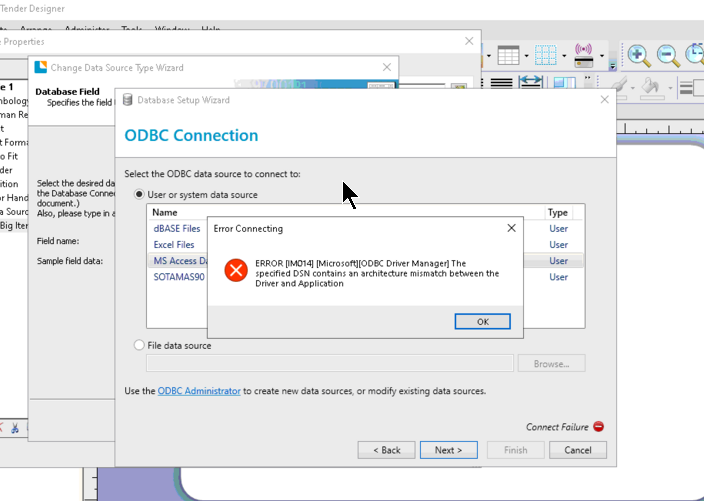
    I can do the PTQ via an Excel query.  All is good so the PTQ is set up correctly.  However, when connecting to the PTQ via Bartender, I get the error message below.  Client is running 32 bit Office.  Their version of Bartender is 64 bit.  I need to verify if this is in fact the situation.  Probably the fastest work around would be to install a 64 bit version of Office.

    Is this this the correct interpretation of the error message?


    ------------------------------
    Jeff Schwenk
    FORMER 90M Board Member -140,000,000 is a TERRIBLE thing to waste!!!
    Bottomline Software, Inc.
    Waynesboro VA
    540-221-4444
    ------------------------------


  • 2.  RE: Bartender Label Printing V11.2\168664 64 Bit- Tricks to connecting to Access DB??

    Posted 07-15-2021 10:43
    I'd say the problem is getting from MS Access to Sage data in a 64-bit thread.  Install the Sage 64-bit ODBC drivers and make sure both your ODBC DSN's are 64-bit.

    ------------------------------
    Kevin Moyes
    Technical Systems Analyst
    Munjal White Consulting Co.
    Toronto ON
    ------------------------------


  • 3.  RE: Bartender Label Printing V11.2\168664 64 Bit- Tricks to connecting to Access DB??

    Posted 07-15-2021 10:47
    As a follow up to the above, if the solution is to install a 64 bit version of Office, this then leads to the question of needing a 64 bit version of the SOTAMAS90 ODBC driver.  Did Sage release a 64 bit for v2016?  IF not, would a 64 version from a later release work?  Or do I just say that this is the straw that breaks the camel's back and you have to get current with Sage.  They are current with their maintenance, but won't upgrade.

    Thoghts?

    TIA

    ------------------------------
    Jeff Schwenk
    FORMER 90M Board Member -140,000,000 is a TERRIBLE thing to waste!!!
    Bottomline Software, Inc.
    Waynesboro VA
    540-221-4444
    ------------------------------


  • 4.  RE: Bartender Label Printing V11.2\168664 64 Bit- Tricks to connecting to Access DB??

    Posted 07-15-2021 11:00
    The 64-bit driver first came out with v2013... you should be OK with just installing the driver from v2016.  SOTAMAS90 should automatically find the 64-bit driver... named DSN's have to be re-created as 64-bit.

    ------------------------------
    Kevin Moyes
    Technical Systems Analyst
    Munjal White Consulting Co.
    Toronto ON
    ------------------------------


  • 5.  RE: Bartender Label Printing V11.2\168664 64 Bit- Tricks to connecting to Access DB??

    Posted 07-15-2021 12:19

    Tried to install the 64 bit.  Ran into this error - Setup was unable to detect an installation of Sage 100. Sage 100 is required for 64-bit ODBC Driver  KB says issue resolved with PU3 or greater.  PU 5 installed.  Sent KB to IT support so they can mess with the Registry.  Several hours of work all due to the desire for newer software......


    ------------------------------
    Jeff Schwenk
    FORMER 90M Board Member -140,000,000 is a TERRIBLE thing to waste!!!
    Bottomline Software, Inc.
    Waynesboro VA
    540-221-4444
    ------------------------------


  • 6.  RE: Bartender Label Printing V11.2\168664 64 Bit- Tricks to connecting to Access DB??

    Posted 07-15-2021 12:54
    Just continue with the installation. 

    I have seen this every time installing on a workstation. 

    The setup seems to think it should be installed only on the server.

    ------------------------------
    Eric Lunceford
    First Mate Business Solutions
    Oklahoma City, OK
    877-880-8960
    https://www.firstmatellc.com/
    ------------------------------


  • 7.  RE: Bartender Label Printing V11.2\168664 64 Bit- Tricks to connecting to Access DB??

    Posted 07-15-2021 13:50
    Don't believe I get an option to finish installing the 64 ODBC.  I believe it aborts.  In any event, their IT told them to download the 32 bit version instead.  Not sure where they were three billable hours ago.

    ------------------------------
    Jeff Schwenk
    FORMER 90M Board Member -140,000,000 is a TERRIBLE thing to waste!!!
    Bottomline Software, Inc.
    Waynesboro VA
    540-221-4444
    ------------------------------


  • 8.  RE: Bartender Label Printing V11.2\168664 64 Bit- Tricks to connecting to Access DB??

    Posted 07-29-2021 17:14
    Back to this one.  Update.   Client just numerous versions of Bartender.  Still not seeing the PTQ's via Access.  Tech support hypothesized there is a higher level of security with later releases.  They are running Office 365 now.  I know if you don't install the correct version of O365, SI does not run properly.   Perhaps this is the reason????

    How do other users set up bartender.  Use the Sotamas ODBC?  Use Access?  Some other method??


    ------------------------------
    Jeff Schwenk
    FORMER 90M Board Member -140,000,000 is a TERRIBLE thing to waste!!!
    Bottomline Software, Inc.
    Waynesboro VA
    540-221-4444
    ------------------------------


  • 9.  RE: Bartender Label Printing V11.2\168664 64 Bit- Tricks to connecting to Access DB??

    Posted 07-29-2021 18:22
    I use the Sage odbc driver.  You need to make sure you have a compatible Sage 100 odbc version installed.


  • 10.  RE: Bartender Label Printing V11.2\168664 64 Bit- Tricks to connecting to Access DB??

    Posted 07-30-2021 12:36
    Edited by Dan Burleson 07-30-2021 17:10
    As strange as it may seem, going through a PTQ doesn't involve the MS Access program, 32-bit or otherwise. Both versions read the same ".mdb" and a PTQ is just part of that file. I'm with the IT folks. You could spend MORE time and turn on ODBC tracing and try to decipher those log messages.

    ------------------------------
    Dan Burleson
    Software Consultant
    Connex Software
    Corvallis OR
    541-224-6642
    ------------------------------