Sr. Consultant
Original Message:
Sent: 02-14-2025 18:55
From: Kevin Moyes
Subject: Auto-Complete
Nice! I hadn't heard that one before.

------------------------------
Kevin Moyes
Technical Systems Analyst
Munjal White Consulting Co.
Toronto ON
------------------------------
Original Message:
Sent: 02-14-2025 18:51
From: Phil McIntosh
Subject: Auto-Complete
aka PICNIC
------------------------------
Phil McIntosh
Friendly Systems
Original Message:
Sent: 02-14-2025 11:57
From: Barbara Goldstein
Subject: Auto-Complete
I googled it too and didn't get a hit! So I'm lame at searches, too. ROTFL
------------------------------
Barbara Goldstein
Sr. Consultant
DSD Business Systems
Original Message:
Sent: 02-14-2025 11:51
From: Brett Zimmerman
Subject: Auto-Complete
Okay, it wasn't just me, lolol. I had to google it and 'Between keyboard and chair' did come up but it didn't click to me; b4 my coffee.
------------------------------
Brett Zimmerman
Net at Work
Greater Boston Area
Original Message:
Sent: 02-14-2025 11:26
From: Barbara Goldstein
Subject: Auto-Complete
:-)
------------------------------
Barbara Goldstein
Sr. Consultant
DSD Business Systems
Original Message:
Sent: 02-14-2025 11:22
From: Kevin Moyes
Subject: Auto-Complete
Between Keyboard And Chair.
😉
------------------------------
Kevin Moyes
Technical Systems Analyst
Munjal White Consulting Co.
Toronto ON
Original Message:
Sent: 02-14-2025 11:19
From: Barbara Goldstein
Subject: Auto-Complete
@Kevin Moyes What does BKAC stand for? Color me acronym/abbreviation deficient.
------------------------------
Barbara Goldstein
Sr. Consultant
DSD Business Systems
Original Message:
Sent: 02-13-2025 22:20
From: Kevin Moyes
Subject: Auto-Complete
SO Entry in my local v2018:
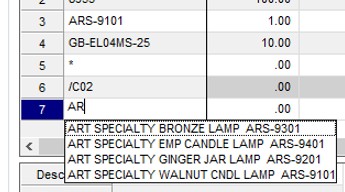
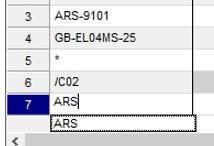
Sounds like the problem is BKAC.
------------------------------
Kevin Moyes
Technical Systems Analyst
Munjal White Consulting Co.
Toronto ON
Original Message:
Sent: 02-13-2025 19:27
From: Barbara Goldstein
Subject: Auto-Complete
I have a client that I just upgraded from 2020 to 2024.1. They reported the same thing as Doug. In Item Inquiry in 2020, they begin typing the item CODE and autocomplete would bring up a list of item codes beginning with the text string. They had the two AC_xxx folders in the old version, but not in the new. I renamed the folders in 2020, logged in and cannot replicate the behavior they describe. I even had one of the users log in as themself, and had the same experience. Weird. Basic autocomplete only is enabled in 2024. Reading through this thread, and my own experience tells me what they claim was their experience shouldn't be true, but more than one user has reported it, so I'm not not understanding how it could be so.
------------------------------
Barbara Goldstein
Sr. Consultant
DSD Business Systems
Original Message:
Sent: 02-03-2025 18:05
From: Kevin Moyes
Subject: Auto-Complete
No harm done... it is often hard to see the forest for the trees.
------------------------------
Kevin Moyes
Technical Systems Analyst
Munjal White Consulting Co.
Toronto ON
Original Message:
Sent: 02-03-2025 18:02
From: Chris Mengerink
Subject: Auto-Complete
You know how I said I'm missing something..............some days I shouldn't be near a computer......thanks Kevin for pointing out my stupidity...off to find a solution for this.
------------------------------
Chris Mengerink
Partner
DWD Technology Group
Original Message:
Sent: 02-03-2025 17:57
From: Kevin Moyes
Subject: Auto-Complete
The enhanced AC includes more fields... but the basic AC search still includes the name (i.e. not ItemCode).
------------------------------
Kevin Moyes
Technical Systems Analyst
Munjal White Consulting Co.
Toronto ON
Original Message:
Sent: 02-03-2025 17:29
From: Chris Mengerink
Subject: Auto-Complete
Thanks Kevin, here is the KB article I was working off of:
Auto-Complete no longer searches the beginning of text for Sage 100 (enhanced versus basic Auto-Complete)
- Running the Build Search Index utility on the Library Master Utilities menu activates the Enhanced auto-complete feature.
- When using the Enhanced auto-complete feature, your search criteria is compared with all words within the searched fields. For example, if you have a customer named Allen's Appliance Repair and a customer named Appliance Services, typing Appl in the Customer No. field results in a list that includes both customers.
- In addition, the number of fields included in the search has been expanded. For example, to search for a vendor by phone number, start typing the phone number, digits only, in the Vendor No. field.
- The older, basic version of auto-complete search worked by comparing your entry to the beginning of the customer, vendor, or item name.
That was what I was hoping to accomplish. It says to simply:
- Browse to the ..\MAS90\MAS_SYSTEM directory on the server
- Rename or Delete the Index_AC and Index_ACencrypt directories that were created
- The basic Auto-Complete will now be used
But it also seems maybe that doesn't work anymore?
------------------------------
Chris Mengerink
Partner
DWD Technology Group
Original Message:
Sent: 02-03-2025 17:04
From: Kevin Moyes
Subject: Auto-Complete
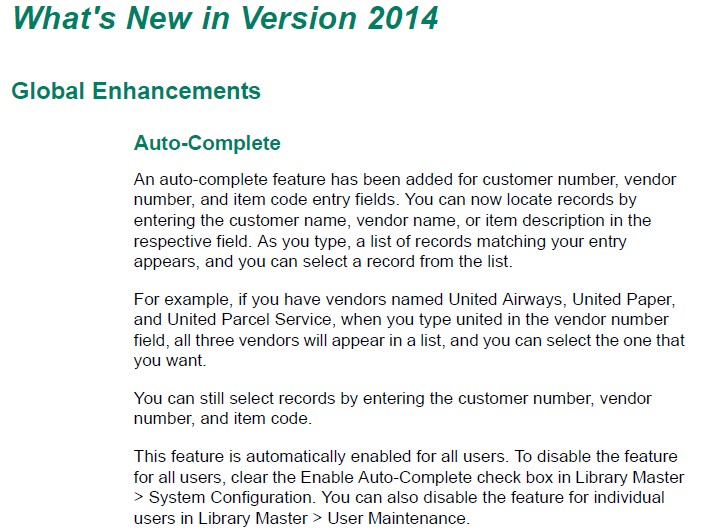
I believe it's worked this way since 2014... and I'm not sure there is a way to have auto-complete be ItemCode only. (There is always F2... to open the ALE).
------------------------------
Kevin Moyes
Technical Systems Analyst
Munjal White Consulting Co.
Toronto ON
Original Message:
Sent: 02-03-2025 16:42
From: Chris Mengerink
Subject: Auto-Complete
So did anyone actually get the basic search to come back? We have a client that wants it to be the begins with on itemcode's, renaming or deleting the two folders mentioned above doesn't seem to have an effect on Sage 100 2023. When I type in itemcode field in sales order entry it only searches by the description....I feel like I'm missing something obvious here but David Overholt and myself are seeing the same thing, we can't seem to get back to basic search type ahead....
------------------------------
Chris Mengerink
Partner
DWD Technology Group
Original Message:
Sent: 01-13-2025 07:12
From: Doug Higgs
Subject: Auto-Complete
Something I just discovered is that if you rebuild the search indexes the 2 folders in mas_system get re-created. I believe I solved the issue. I now just need to clarify what search method the customer prefers.. the old method or the new method.
------------------------------
Doug Higgs
Midwest Commerce Solutions, Inc
(312) 315-0960
Chauffeur, Chef, and Personal Assistant to Sprinkles
Original Message:
Sent: 01-10-2025 08:46
From: Brett Zimmerman
Subject: Auto-Complete
Have you seen this kb? https://us-kb.sage.com/portal/app/portlets/results/viewsolution.jsp?solutionid=225924350084634&page=1&position=0&q=Index_ACencrypt
Auto-Complete no longer searches the beginning of text for Sage 100 (enhanced versus basic Auto-Complete)
Created on
| Last modified on
Highlight MatchesAuto-Complete no longer searches the beginning of text for Sage 100 (enhanced versus basic Auto-Complete)
Description
Cause
- Running the Build Search Index utility on the Library Master Utilities menu activates the Enhanced auto-complete feature.
- When using the Enhanced auto-complete feature, your search criteria is compared with all words within the searched fields. For example, if you have a customer named Allen's Appliance Repair and a customer named Appliance Services, typing Appl in the Customer No. field results in a list that includes both customers.
- In addition, the number of fields included in the search has been expanded. For example, to search for a vendor by phone number, start typing the phone number, digits only, in the Vendor No. field.
- The older, basic version of auto-complete search worked by comparing your entry to the beginning of the customer, vendor, or item name.
Resolution
Sage 100 2019- Browse to the ..\MAS90\MAS_SYSTEM directory on the server
- Rename or Delete the Index_AC and Index_ACencrypt directories that were created
- The basic Auto-Complete will now be used
Sage 100 2018
If the older, basic version of auto-complete is desired, perform the following steps:
- Browse to the ..\MAS90\MAS_SYSTEM directory on the server
- Rename or Delete the Index_AC directory that was created
- The basic Auto-Complete will now be used
For more information, in Sage 100 Help, search "Auto-Complete Search"
DocLink: Auto-Complete does not display newly added customers, employees, items, or vendors
Steps to duplicate
1. Install Sage 100 2017 2. Go into Customer Maintenance enter an A and only customers with an A will show 3. Install PU1 4. Go to Library Master, Utilities 5. Run Build Search Index 6. Click ok to message 7. Go into Customer Maintenance enter an A and any customer with an A in the Customer No, Customer Name, Customer Address will now come up in the Autofill results
------------------------------
Brett Zimmerman
Net at Work
Greater Boston Area