Sage 100

 View Only
Expand all | Collapse all

AP Invoice import with taxes enabled, but no pre-calculated invoice total

  • 1.  AP Invoice import with taxes enabled, but no pre-calculated invoice total

    Posted 05-13-2019 14:51
    Edited by Kevin Moyes 05-13-2019 15:23

    KB article 68794 indicates that presetting an InvoiceAmt with an AP invoice import is not necessary.

    This is true.  Tested with ABC data and no InvoiceAmt in the header record, which imported fine.
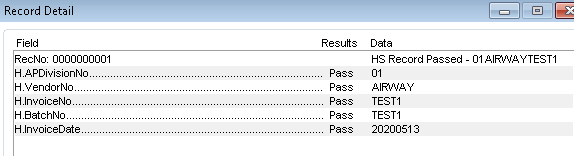
    And the resulting invoice has an automatically calculated invoice amount.  Perfect.
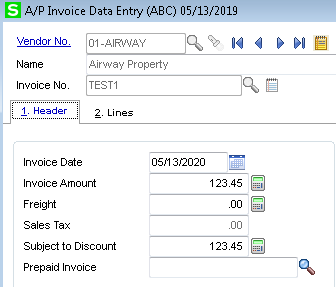
    However, as soon as I change the invoice to taxable, it fails with an out of balance error, when using the exact same import (only changing TaxClass from NT to TX) and exact same data.

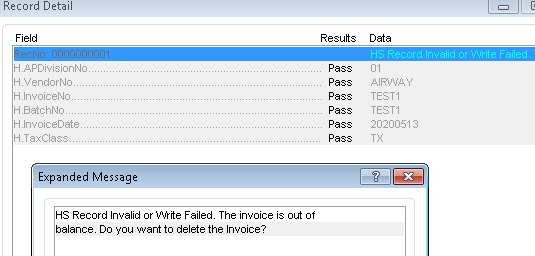
    The vendor source files I'm dealing with do not have reliable tax calculations (constant penny rounding issues) and I need the import to work with taxes but without a pre-calculated invoice amount.  Is this at all possible?

    Yes, I know I can import the tax amounts as GL lines, but then I have to do a scripted manipulation of the import files to handle that, which I'd really like to avoid.

    (My test system is v2018.5, if it matters).


    ------------------------------
    Kevin Moyes
    Technical Systems Analyst
    Munjal White Consulting Co.
    Toronto ON
    ------------------------------


  • 2.  RE: AP Invoice import with taxes enabled, but no pre-calculated invoice total

    Posted 03-22-2021 13:07
    @Kevin Moyes, do you recall how you made out with this?​

    ------------------------------
    Brett Zimmerman
    Net at Work
    Greater Boston Area
    ------------------------------


  • 3.  RE: AP Invoice import with taxes enabled, but no pre-calculated invoice total

    Posted 03-22-2021 13:29
    I'm also curious which amount field you were passing if you didn't include InvoiceAmt.

    ------------------------------
    Brett Zimmerman
    Net at Work
    Greater Boston Area
    ------------------------------


  • 4.  RE: AP Invoice import with taxes enabled, but no pre-calculated invoice total

    Posted 03-22-2021 13:44
    I have a client with an import from Concur expenses that had been working just fine.  This past week, it started throwing OOB errors (and Brett - the only field I passed was the L-DistributionAmount).
    I had to click on the Header separate from Lines check box to make it work - but did NOT specify anything in Records about what made a header record versus a line record, which means it totally should not work.
    And, to top it off, if I ran it from my machine, connecting to their Citrix system, I did not have to make any changes to the import at all.

    I'm all for blaming the Microsoft updates.

    ------------------------------
    Beth Bowers
    Mom to Samson, Peanut, ChiChi, Canton, Cagney and Daisy (NO Oxford comma - shriek!)
    Tennessee Software Solutions
    269-445-1625
    ------------------------------


  • 5.  RE: AP Invoice import with taxes enabled, but no pre-calculated invoice total

    Posted 03-22-2021 14:10
    Edited by Brett Zimmerman 03-22-2021 14:10
    You're only passing the line DistributionAmount?  I tried that but InvoiceAmount and NetInvoiceAmount didn't populate.  Part of my problem is that we only have the full invoice amount including sales tax, in our import source xls.

    ------------------------------
    Brett Zimmerman
    Net at Work
    Greater Boston Area
    ------------------------------


  • 6.  RE: AP Invoice import with taxes enabled, but no pre-calculated invoice total

    Posted 03-22-2021 14:26
    Edited by Brett Zimmerman 03-22-2021 17:30
    So what I'm now gathering is that this import isn't really feasible if you only have the 'full invoice amount incl sales tax'.  It appears the net invoice amount (pre-tax) is required.  So unless there's a way to back into it, might be SOL.

    Corr:
      Actually it appears we'd need the line item pre-tax amounts and/or total invoice sales tax (in additional to invoice total) - see post further below. 

    ------------------------------
    Brett Zimmerman
    Net at Work
    Greater Boston Area
    ------------------------------


  • 7.  RE: AP Invoice import with taxes enabled, but no pre-calculated invoice total

    Posted 03-22-2021 15:42
    Actually I believe you can import with a tax included total, but it has to be the 100% exact correct amount (no penny rounding issues).

    We ran the input file through a VBScript to pre-calculate the tax amount / tax-included-total, set invoices to non-taxable, and in the script added the taxes as a line amount.  It's a Canadian customer though, and our sales taxes are much less complicated up here, so I'm not sure if that strategy would work for a US system.

    ------------------------------
    Kevin Moyes
    Technical Systems Analyst
    Munjal White Consulting Co.
    Toronto ON
    ------------------------------


  • 8.  RE: AP Invoice import with taxes enabled, but no pre-calculated invoice total

    Posted 03-22-2021 17:41
    Looks like we'd actually need column in our source xls for the line item pre-tax amounts and/or total invoice sales tax (in additional to invoice total).  One issue with using sales tax though to back into the line item amounts, is that it won't really work with multi-line invoices (assuming the tax amount is at the invoice/header level) due to "out-of-bal".

    So we proceeded with using the line item amounts, and I'm importing InvoiceAmt and DistributionAmt.  NetInvoiceAmt is auto-calculating/populating.


    ------------------------------
    Brett Zimmerman
    Net at Work
    Greater Boston Area
    ------------------------------


  • 9.  RE: AP Invoice import with taxes enabled, but no pre-calculated invoice total

    Posted 03-29-2021 17:49


    ------------------------------
    Brett Zimmerman
    Net at Work
    Greater Boston Area
    ------------------------------


  • 10.  RE: AP Invoice import with taxes enabled, but no pre-calculated invoice total

    Posted 04-28-2021 15:15
    Currently we've switched to using an import into 'P/O ROG w/ invoice' (no PO# needed), instead of A/P Inv Entry - primarily so that we can easily control which lines are taxable/non-taxable.

    ------------------------------
    Brett Zimmerman
    Net at Work
    Greater Boston Area
    ------------------------------