Test file generated on 6/24 "looks good" when opened in Notepad and was accepted by bank, although there was only 1 payment.
Live file generated yesterday, 8/26, was rejected by the bank (BMO Harris) with this note: "Your consultant would need to correct the settings in your software for each line to end at position 94 and ensure the file is generated as a text (.txt) file". Of course, Sage can't generate a .txt file, but the user renamed the extension to .txt before uploading.
The file does not "ook "good" in Notepad or Notepad++. There are multiple vendor payments in the file. I have copied the file to my local workstation. When opened, it looks the same as when opened in their environment.
I replicated their settings in my local 4.5. When I generate a file and view it in Notepad or Notepad++, the file looks "good". However, when I copy it to their system and open it in Notepad, it changes. I've turned WordWrap on and off and it still doesn't look right.
Here's a comparison of the file generated on my system:
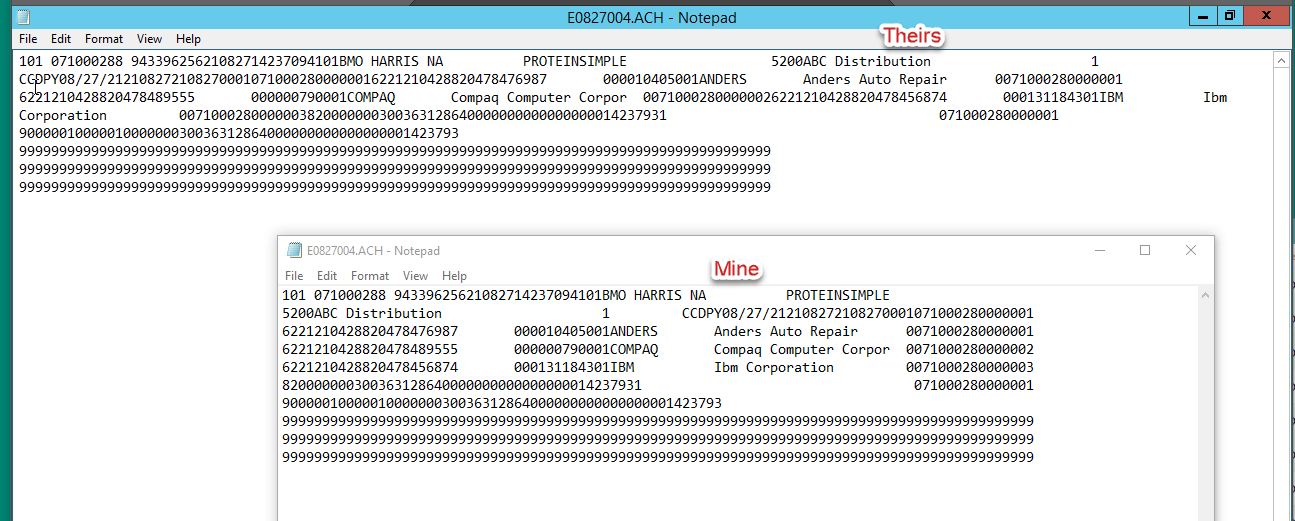
Relevant settings (at least the ones I think are relevant:
File Control Record: Pad File to Block Size enabled – Block Size to 10
Add CR/LF After Each Record = Yes.
The NACHA spec they provided calls for Block Size 10. I have experimented with all 5 options for CR/LF. In their system, I can't get a file that looks good. On my system, in NotePad++, the files with Yes, CR only and LF all view the same, but I'm guessing are structurally different.
I have 2 problems to solve:
1. Does renaming the extension to .TXT make the file unrecognizable to them?
2. What config changes are necessary? I don't know how, in Sage, to correct the setting per the bank's comment - "Your consultant would need to correct the settings in your software for each line to end at position 94"
Any ideas?
------------------------------
Barbara Goldstein
Sr. Consultant
DSD Business Systems
San Jose CA
800.627.9032 x221
------------------------------