Since the Command query is linked by EmployeeKey with a Left Outer Join, nothing will be blocked if you use formulas that test for the query's fields for null before using them.
See the formula {@YTD_HoursIncl} in the sample report for the prior historical hours plus the current check's hours.
if isnull({myPR_EmployeeEarningsHist.[YTD_Hours]})
Then Sum({PR_CheckPrintingWrk.EarningsHours}, {PR_CheckPrintingWrk.StubNo})
else {myPR_EmployeeEarningsHist.[YTD_Hours]} + Sum({PR_CheckPrintingWrk.EarningsHours}, {PR_CheckPrintingWrk.StubNo})
The only issue I see would be if there were multiple checks for the same employee in the same run. In that case neither check would be aware of the other check's hours, but that is the case when using a sub report.
I suggest that you use a test company and compare the output of this sample report to your client's existing report. I am curious how much more quickly this sample runs versus the one with a sub report.
------------------------------
Dan Burleson
Software Consultant
Connex Software
Corvallis OR
541-224-6642
------------------------------
Original Message:
Sent: 03-07-2022 15:38
From: Jon Parkinson
Subject: Add YTD hours to pay stub in 'new payroll'
@Dan Burleson
I will try using the Command - in my subreport. I am concerned that attempting to link the command in the main report will result in records being blocked if the earnings code was not previously used in the calendar year by the employee being printed. Do you agree?
------------------------------
Jon Parkinson
Timac Business Systems
------------------------------
Original Message:
Sent: 03-06-2022 04:46
From: Dan Burleson
Subject: Add YTD hours to pay stub in 'new payroll'
@Jon Parkinson, @Brett Zimmerman: To speed things up you could calculate total YTD hours by adding a "Command" table to the report instead of using a sub report.
A Command query within the Crystal reports is similar to a SQL stored procedure and can be used to summarize a history table. In this case, a summarized "PR_EmployeeEarningsHist" query could be added for the historical hours by "EmployeeKey" and use the "PR_Options" table to isolate current year's history records. While a sub report will scan the entire history for every employee check, a summarized command table can be linked by "EmployeeKey" and runs much faster.
When linked with a Left Outer Join, this summary "Command" query provides the field "[YTD_Hours]" for your main report from which you can calculate the current YTD hours and include the current check's hours. A sample report is attached (thorough testing is required!).
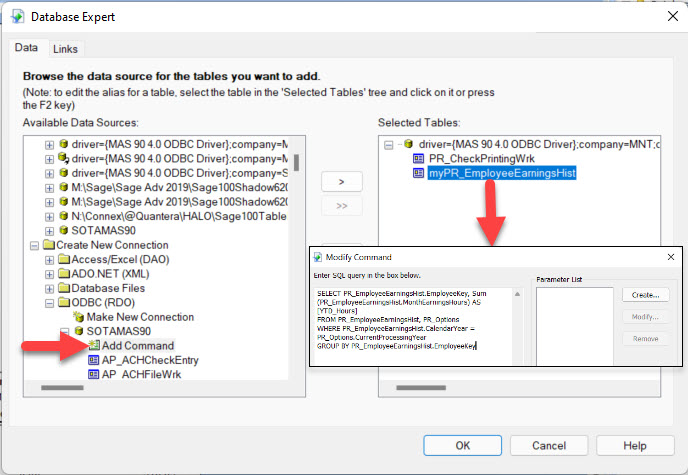
'myPR_EmployeeEarningsHist' Command query SQL statement:
SELECT PR_EmployeeEarningsHist.EmployeeKey, Sum(PR_EmployeeEarningsHist.MonthEarningsHours) AS [YTD_Hours]
FROM PR_EmployeeEarningsHist, PR_Options
WHERE PR_EmployeeEarningsHist.CalendarYear = PR_Options.CurrentProcessingYear
GROUP BY PR_EmployeeEarningsHist.EmployeeKey
------------------------------
Dan Burleson
Software Consultant
Connex Software
Corvallis OR
541-224-6642
Original Message:
Sent: 03-03-2022 16:19
From: Beth Bowers
Subject: Add YTD hours to pay stub in 'new payroll'
I'd just like to mention that you two should check out the first item on the list of potential Mod Squad mods to vote on...
------------------------------
Beth Bowers
Mom to Samson, Peanut, ChiChi, Canton, Cagney and Daisy (NO Oxford comma - shriek!)
Tennessee Software Solutions
269-445-1625
Original Message:
Sent: 03-03-2022 13:48
From: Jon Parkinson
Subject: Add YTD hours to pay stub in 'new payroll'
Brett - I am having the same issue with a client. I have used a sub-report to calculate YTD hours, but it slows down payroll processing by over an hour! Any options would be very welcome! Please keep me posted with your findings.
------------------------------
Jon Parkinson
Timac Business Systems
Original Message:
Sent: 01-31-2022 12:44
From: Brett Zimmerman
Subject: Add YTD hours to pay stub in 'new payroll'
Thus far it appears I could maybe use a subreport against PR_EmployeeEarningsHist, but was hoping there was something a bit more straight-forward that I might be overlooking.
------------------------------
Brett Zimmerman
Net at Work
Greater Boston Area