Sage 100

 View Only
  • 1.  Add a Secondary Vendor Selection to Item Maintenance via Custom Office

    Posted 03-18-2022 00:55
    Has anyone added the vendor lookup on the Item Maintenance as a secondary vendor where the magnifying glass can be used to select the vendor?  This is for Sage 100 2020 Premium.  I know I can add a UDT, but that would require the UDT to be continually updated with new vendors.  Below is a look at what is being requested.


    ------------------------------
    [Michele] [Herzog] [CPA,CITP, CGMA]
    [Overland Park] [KS]
    [816-520-1365]
    ------------------------------


  • 2.  RE: Add a Secondary Vendor Selection to Item Maintenance via Custom Office

    Posted 03-18-2022 02:35
    Edited by Dan Burleson 03-18-2022 02:35
    Michele,

    You could use scripting to maintain the UDT. A Post Write script to AP_Vendor could ensure the vendor was in the UDT and a Post Delete script could remove deleted vendors. Alternatively, you could schedule a V/I job to periodically copy AP_Vedor fields to the UDT.

    Dan

    ------------------------------
    Dan Burleson
    Software Consultant
    Connex Software
    ------------------------------


  • 3.  RE: Add a Secondary Vendor Selection to Item Maintenance via Custom Office

    Posted 03-18-2022 10:16
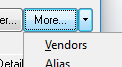
    Why not use the Item Vendors feature?  That allows multiples... and while not possible to display the list directly on an IM panel, it's two clicks away.

    ------------------------------
    Kevin Moyes
    Technical Systems Analyst
    Munjal White Consulting Co.
    ------------------------------


  • 4.  RE: Add a Secondary Vendor Selection to Item Maintenance via Custom Office

    Posted 03-18-2022 16:05
    Probably with a little tweak, we can add a button next to Primary Vendors to bring up the Item Vendors Maintenance screen. 1-click instead of 2. I just did this for Customer Maintenance last week to bring up the Paperless  Office Delivery Options screen. I'll post it if anyone interested.

    ------------------------------
    Alnoor Cassim

    Email: alnoor_asifocus_com@growthzone.testinator.com
    Ph:
    ------------------------------


  • 5.  RE: Add a Secondary Vendor Selection to Item Maintenance via Custom Office

    Posted 03-18-2022 16:39
    Edited by Alnoor Cassim 03-18-2022 16:44
    Couple of ideas:

    1. If you want to just show the 2nd vendor from Vendor Item Maintenance, a PostRead script can grab that to show both 2nd vendor and Vendor Name, which can be placed into a UDF (or add a button instead and have the script put 2nd vendor in the button text itself - bonus is if you click the button it bring us the Vendor Item Maint screen which is Idea No 2 below).

    2. Extending Kevin's idea of using Item Vendors feature, you could add a button just below Primary Button to open Vendor Item Maintenance in 1-click. Here are the details:

    1. Ctrl-F9 or Customizer Selection positioned on PMAIN
    2. Add a normal Custom Office button.
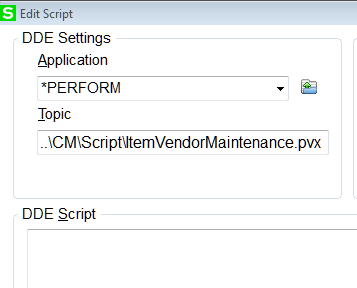
    3. Go to Link Settings tab. Leave it at DDE. Hit the Edit Script button off to the right.
    4. Make it look the screenshot here:

    5. Create a text file in \mas90\CM\Script and call it ItemVendorMaintenance.pvx
    6. Put these 2 lines in and save the file
      _OBJ'BT_VENDOR()
      EXIT

    7. Save the screen in Customizer, open Item Maint, pull up an item, and click the button.

    This is very simple Perform Logic. It can also be called with a button script instead of doing it the way I mentioned. 
    Also if you want a Paperless Delivery Options in 1-click from Customer Maintenance (how it used to be) follows steps above but the 2 lines change to:
    _OBJ'BT_PaperlessDelOptions()
    EXIT


    ------------------------------
    Alnoor Cassim

    Email: alnoor_asifocus_com@growthzone.testinator.com
    Ph:
    ------------------------------


  • 6.  RE: Add a Secondary Vendor Selection to Item Maintenance via Custom Office

    Posted 03-19-2022 02:22
    Here's a post on Sage City that I posted.  It contains a script template for adding the magnifying glass button to multi-line UDFs.  This avoid the needs for a UDT that has to mirror a source table because it is using the same lookup that the stock fields would use.  The post linked below requires version 2015+ in order to use the UI post load event.  There is another post further below it that is a workaround for version 2014-.
    https://www.sagecity.com/us/sage100_erp/f/sage-100-technical-and-installation-discussions/165123/udf-data-source--cust-maint/424556#424556

    ------------------------------
    David Speck II
    Tennessee Software Solutions
    ------------------------------


  • 7.  RE: Add a Secondary Vendor Selection to Item Maintenance via Custom Office

    Posted 03-28-2022 01:34
    Huge thanks to @David Speck II for going the extra step and providing me additional setup details as scripting is not my area.  Also thanks @Alnoor Cassim, I was also in the midst of trying your solution.  This client wanted a "click" option on the main screen.​​

    ------------------------------
    [Michele] [Herzog] [CPA,CITP, CGMA]
    [Overland Park] [KS]
    [816-520-1365]
    ------------------------------