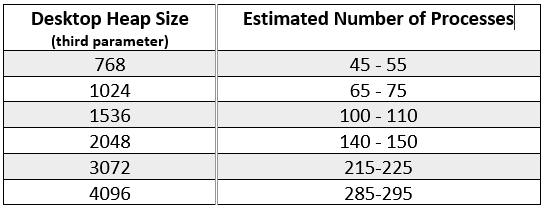
If the only issue is heap memory, running as a service with the appropriate registry adjustment should be fine. (We typically start as a service, and only flip to application mode if there are issues, then try the registry hack to get back to running as a service...).
------------------------------
Kevin Moyes
Technical Systems Analyst
Munjal White Consulting Co.
Toronto ON
------------------------------
Original Message:
Sent: 04-01-2025 17:53
From: Greg Stiles
Subject: A way to gracefully terminate Sage tasks automatically
Isn't it always better to run from the desktop? Especially when you have 70+ users?
------------------------------
Greg Stiles
DSD Business Systems
------------------------------
Original Message:
Sent: 04-01-2025 17:37
From: Kevin Moyes
Subject: A way to gracefully terminate Sage tasks automatically
This registry adjustment (option II) works well for that.
https://us-kb.sage.com/portal/app/portlets/results/viewsolution.jsp?solutionid=222924550020344
------------------------------
Kevin Moyes
Technical Systems Analyst
Munjal White Consulting Co.
Toronto ON
Original Message:
Sent: 04-01-2025 17:01
From: Greg Stiles
Subject: A way to gracefully terminate Sage tasks automatically
It's not running as a service because they have so many users.
Original Message:
Sent: 4/1/2025 4:44:00 PM
From: Kevin Moyes
Subject: RE: A way to gracefully terminate Sage tasks automatically
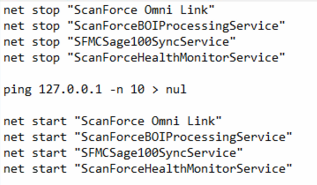
Maybe use a NET STOP servicename, then NET START servicename... in the scheduled task?
Edit: example from a ScanForce scheduled task...
------------------------------
Kevin Moyes
Technical Systems Analyst
Munjal White Consulting Co.
Toronto ON